How can we help?
The One Group Central Help Center explains how to set up an organization's portal, invite and manage members, run elections and polls, change settings and billing, and fix sign-in problems. Members, admins and owners each have their own section, and every guide names the screen and the button to use.
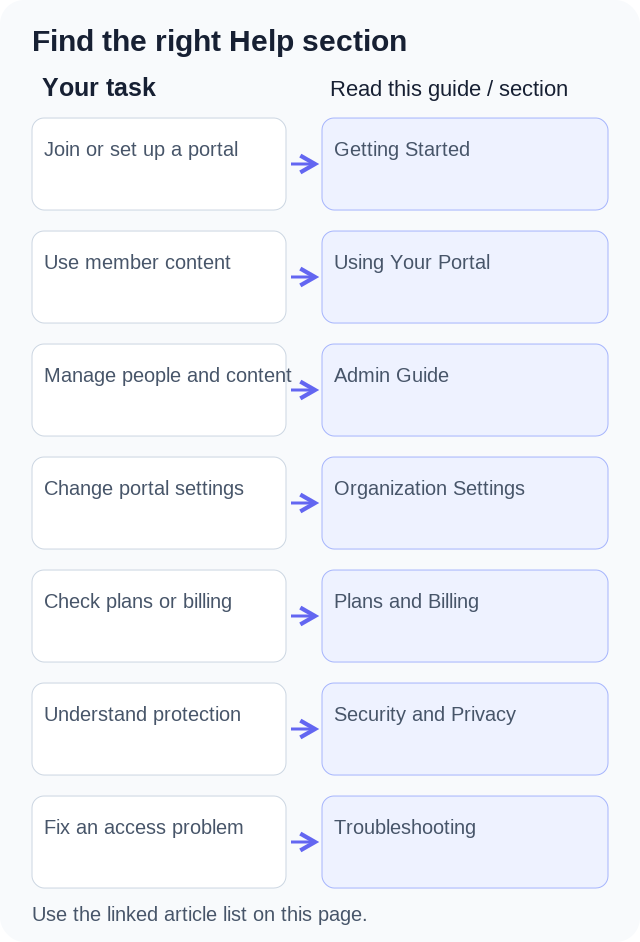
How do I join or set up a portal?
Create an organization, accept your invitation, sign in and install the app. Follow the first steps before inviting members or reading portal content.
All 6 articles →How do I use my organization's portal?
Find your documents and announcements, vote, answer polls, use member chat and RSVP to events. These guides explain each task and its access limits.
All 16 articles →How do I manage members and portal content?
Invite members, set their permissions, publish documents and announcements, and run elections. Check the steps and limits for each admin task.
All 18 articles →How do I change organization settings?
Set your organization's identity, colors, features and notification wording. Learn which permissions you need and how saved settings affect members.
How do plans, limits and billing work?
Compare plan prices and member, email and storage caps. Learn how the trial, checkout, upgrades and cancellation affect your organization's access.
How are accounts, documents and votes protected?
Set up two-factor authentication and understand encrypted documents, voting privacy and receipt checks, including what the current service cannot prove.
How do I fix a portal access problem?
Work through sign-in errors, missing invitation emails and expired links. Find what you can retry yourself and when an organization admin needs to help.
Every help article
Getting Started
- What is One Group Central? One Group Central puts your group's documents, messages, votes and meetings in one private member portal. See each feature and follow the full guides.
- Create your organization Create your organization's One Group Central portal, choose its address, and try it for 60 days with up to 25 people and no credit card.
- Accept an invitation Use your emailed invitation link to create your One Group Central account, set a 12 character password, and join your organization's portal.
- Sign in to your portal Find your organization's portal address, sign in with email and password, enter a 2FA code if enabled, and understand every sign in error message.
- Install the app on your device Install One Group Central as a home screen app on your desktop, iPhone, or Android device straight from the browser.
- Quick tour of your portal A tile by tile tour of the One Group Central home screen, unread badges, the Members tab, the profile icon, and where admins find the Admin Panel.
Using Your Portal
- Viewing and searching documents How members browse, search, sort, and open documents, view PDFs in the app, download other files, and read encrypted documents with the lock badge.
- Reading announcements from the News tile How members read announcements, filter by category, open attachments, and message the announcement owner with the Ask about this button.
- Voting in elections step by step How members vote in elections, what scheduled, open, closed, and tallied statuses mean, how anonymity works, and where to find final results.
- Vote receipts and verifying your vote What the Vote Confirmed receipt shows, what Election ID, Chain Position, and Entry Hash mean, and how to verify your vote was recorded.
- Answering polls and surveys Release preview guide to answering polls and surveys, saving progress, editing when allowed, and understanding who can read your results.
- Using the calendar and RSVPing to events How members open the calendar, switch between six views, RSVP Going, Maybe, or No, and add the calendar to Apple or Google Calendar in one tap.
- Chat basics, channels, and direct messages Send messages in channels and direct messages, star the conversations you use most, add attachments and reactions, reply in threads, and report a message.
- Bookmark chat messages to find them later Save important chat messages with a private bookmark, review them in the Bookmarks sheet, and jump back to the original conversation.
- Member directory, search, and contacting members Browse and search your organization's member directory, contact a member by email with one tap, and understand who appears in your list.
- Resources and quick links from your organization Find the curated links your admins share in the Resources section, search and sort them, and open them in your browser with one tap.
- Your profile, photo, and security settings Edit your name, title, photo, and contact details, change your password, manage push notifications, turn two-factor on or off, and sign out.
- Notifications, unread badges, and status banners What sends you a push, how the unread badges on each tile and the app icon count, and how opening an item marks it read.
- Blocking and reporting in chat How to block a member so their messages stop reaching you, how to undo it, how to report a message for review, and what the language filter does.
- View event galleries and contribute photos How to find event albums, viewing and downloading photos, contributing as an editor, and understanding gallery access.
- Pay dues and event fees Release preview guide to checking a charge, paying through secure checkout, viewing payment history, and contacting the recipient about a refund.
- Delete your account How to delete your own member account from Profile in the app, what you need first, what deletion removes and which records stay with your organization.
Admin Guide
- Admin Panel overview and dashboard tour Find the Admin Panel, learn what every drawer item does, understand the dashboard cards, and see why some items may be hidden from your view.
- Inviting Members One at a Time Send a single invite, choose a role, add groups, copy the one time link, and manage pending, accepted, revoked, and expired invites.
- Bulk inviting members with a CSV file Upload a CSV of names, titles, emails, and roles, review each row in the staging table, assign a required group, and send invites in one batch.
- Roles and permissions for owners Understand member, admin, and owner roles, promote or demote members, add or change owners, fine tune permissions, and suspend accounts.
- Member groups: create, assign, and target Create groups, assign members, target documents, announcements, events, polls, and elections at specific groups, and read group analytics.
- Publishing documents to your members Upload documents, organize with categories, target groups, announce new files, assign managers, verify integrity, and understand OCR and delete.
- Sensitive document vault for ID photos Encrypt ID photos and other sensitive files at rest with the Sensitive toggle; open them in the app's secure viewer, with admin access by default.
- Sending Announcements and Broadcasts Compose and send announcements to members by email, push and text. Format with markdown, attach files, target groups, and schedule sends for later.
- Running an election from draft to results Create, open, close, reopen and tally an anonymous election, or copy one to run again. Covers ballot options, scheduling, eligibility and results.
- Creating polls and surveys Release preview guide to creating polls and surveys, choosing participant and results groups, assigning owners, and exporting submitted answers.
- Managing the Calendar and Events Create, edit, and delete events, view RSVPs, import .ics files, and subscribe to external calendars that sync automatically into your portal.
- Scan a printed schedule into the calendar Photograph a printed or handwritten schedule and turn it into calendar events. Review detected events, fix details, and add them in one tap.
- Managing chat channels and moderation Create and organize chat channels, restrict channels to groups, archive or delete, moderate messages, and manage the automatic General channel.
- Using the audit log Review admin and member actions in the audit log. Search, filter by area, inspect entry details, and export the full log to CSV for records.
- Staged rosters, upload people without inviting them Upload a roster without emailing anyone, choose which groups or individuals can review the list, then send the invitations once it is right.
- Preserve election records and grant observer access How election record preservation works, how owners extend it and grant observer access, and what the redacted JSON audit report does and does not prove.
- Manage event galleries and photo access How admins run event albums: separate viewing and editing access, drafts, photo uploads, captions, covers, publication, and storage.
- Manage dues and event collections Release preview guide to recipient setup, approving event collectors, assigning dues, checking collections, and stopping new payments.
Organization Settings
- Organization settings overview Tour of the Settings screen and its eight tabs. Learn what each tab controls, how saving works, and which admin permission each section requires.
- Branding and theme: logo, colors, and fonts Set your organization name, tagline, logo, and favicon on the Identity tab, then pick brand colors, a font, and dark mode on the Theme tab there.
- Feature toggles: turn portal features on or off Understand feature switches in Settings, what turning each one off does, and the Event gallery switch added by the next release.
- Notification templates: invites and announcements Customize the invite email, invite SMS, and announcement default wording on the Notifications tab, using the org name and invite URL variables.
- Send email from your own domain Set up your organization's email sending domain, check its DNS records, and learn how invitations and announcements use the verified address.
Plans and Billing
- Plans and limits: pricing and what each plan includes Compare Trial, Starter, Growth, Plus, and Enterprise plans by member, email, and storage caps. Every plan includes every feature of the portal.
- Free trial: 60 days, no credit card How the 60 day free trial works, its member, email, and storage caps, what happens the day it ends, and the one trial per email address rule.
- Upgrade Your Plan From the Billing Screen Step by step guide to the Billing screen, choosing a plan, paying securely through Stripe Checkout, and confirming your new caps took effect.
- Usage limits: members, emails, and storage caps Read the Usage card meters, learn the exact errors at each cap, know when monthly email counts reset, and what to do when you hit each limit.
- Cancel or Pause Your Subscription The three owner only cancellation options, what each one does with your data, why nothing happens instantly, and how to withdraw the request.
Security and Privacy
- Security overview: how your portal is protected A plain English tour of One Group Central security, covering invite-only access, encryption, passwords, two-factor authentication, and audit logging.
- Two-factor authentication setup and use (TOTP) How to turn on two-factor authentication in One Group Central, sign in with a 6-digit authenticator code, and what to do if you lose your device.
- How anonymous voting works, a plain English guide How election nullifiers, encrypted ballots, and receipts work, including the current service-operator privacy and verification limits.
- Check your vote receipt against the election record How to check your vote receipt in the app, what the vote chain contains, and what the Merkle root shown at tally is for.
- Document encryption and the sensitive vault How One Group Central protects sensitive documents with per-file encryption, a secure viewer, view auditing and live key deletion, with backup limits.
Troubleshooting
- Can't sign in? Fix every login problem step by step Work through every One Group Central sign in failure, from wrong portal address and forgotten passwords to suspended accounts and 2FA code errors.
- Not receiving invite or password reset emails What to do when a One Group Central invitation or password reset email never arrives, including spam checks, corporate filters, and resending invites.
- Invite link expired or already used, what to do Why a One Group Central invitation link stops working after 7 days or one use, what the error screens mean, and how an admin restores an invite.
- Common error messages explained A reference for the error messages anyone may see in One Group Central, what each one means, and the fastest fix, from voting errors to quota limits.
- Members can't see a document Why members cannot see a document that admins can, and what to check: the document's group, Sensitive, View Documents, removal, and the feature switch.
Published: . Last updated: .