A member portal that treats governance like it matters
Run board elections where ballots are encrypted and the board sees totals only. Keep your official records in one place. Send news to every member, and give them a directory. It all lives in one portal with your name and logo. It is made for nonprofits that take their bylaws and their members' privacy seriously.
60 days free for up to 25 people, no credit card. Paid plans from $49/month for your whole organization.
Built for the way nonprofits really work.
It is a private portal, and only people you invite can join. Only other members of your group can see member profiles. There are no engagement scores.
Keep your current service for dues and event payments. Member payments in One Group Central are a development preview. They are not live, and collecting money is turned off.
Anonymous board elections
Ballots are encrypted before they are stored. Once the vote is tallied, the board sees the count for each candidate, not anyone's ballot. Voters can confirm their own ballot was recorded. They use the receipt the app saves on the device they voted from. Know one limit before a sensitive vote. Our servers handle each ballot with the voter's login just before it is encrypted, and we hold the election keys. So a ballot is out of your board's sight, but not out of ours.
How it works →Your records in one place
Keep bylaws, articles of incorporation, 990s, audited financials, board minutes and committee reports in one place. You set who sees what by role and group. The board sees everything. Members see what your bylaws say they can.
A directory members can use
Members can search it and see names, titles and photos. The directory shows an email icon instead of the address, and a tap opens a message to that member. You can turn the directory off if your bylaws prefer.
News that reaches everyone
Send news by email to all members, one chapter or one committee, and it shows as unread in the app. Members on iPhone also get push alerts in the free One Group Central app from the App Store, and can turn them off in their profile. Members on Android or in a browser get the email and the badge. A branded mobile app, an add-on, brings push alerts to Android phones too.
Member groups
Set up groups for committees, working groups, chapters or dues classes. Named poll results break down by group. For elections, you see only how many in each group could vote, never how anyone voted.
Branded mobile app
Get your own app in the App Store and Google Play, with your name, logo and colors. This is the Branded Mobile App add-on. It comes with Enterprise.
How to get your nonprofit set up
Here is how it goes.
Create your portal
Sign up in a few minutes. Add your logo and colors so the portal looks like your nonprofit, not us. During the trial we load your member list for you. A spreadsheet file (CSV) is fine.
Add your key records
Add your bylaws, articles, 990s and board minutes. Sort them into folders and set who can see each one. New board members then find it all in one place.
Run your first board election
Pick who can vote, add the candidates and open the ballot. Voting stays open until you close it. So press Close & Tally when your bylaws say voting ends. The totals are then counted and shown to every member who could vote. For a vote with names attached, use a named poll.
Frequently asked questions
Does the IRS require nonprofits to keep voting records?
We cannot answer that for your organization, so ask your accountant or counsel. This answer is not legal advice. Here is what One Group Central keeps. It keeps the totals for each election. It keeps the encrypted ballots, each added to the end of the election record. It also keeps an audit log you can export to CSV for your minutes. The key that opens the ballots is deleted when the count runs. So the totals are the lasting record, and the ballots cannot be recounted.
Can our nonprofit run anonymous votes for sensitive issues?
Yes. Every election stores ballots in encrypted form and shows admins totals only. That suits officer elections, dues increases and any vote where members might feel pressure. On a small vote, a total can still reveal a choice, for instance when every voter picks the same option. Polls can hide names from admins or show them. You choose for each poll.
Can we limit voting to members in good standing?
Yes. You set who can vote in each election using member groups. Keep a group for members in good standing, a chapter or any class your bylaws define. Then limit the election to that group. The voter list is taken from the group when you create the election. Moving someone into or out of the group later does not change it. There is one exception. A new member who joins through an invite while the election is a draft, scheduled or open is added to its list automatically, if they qualify. So check late joiners against your rules before you close the vote.
Is this affordable for a small nonprofit?
Yes. The Starter plan is one flat monthly fee, with no charge per member. Verified nonprofits get 20 percent off any plan with proof of 501(c)(3) status. You can combine it with yearly prepay.
Learn how to run better nonprofit votes.
Plain English guides for executive directors and board chairs.
How to run a nonprofit board election online
From the bylaws check to the final count, in a contested year or a quiet one.
How anonymous voting works
How secret ballots and vote receipts work, without the math.
County society officer elections
How county societies run officer votes online.
How to amend your bylaws
Notice, quorum and the vote you need, so a bylaws change holds up.
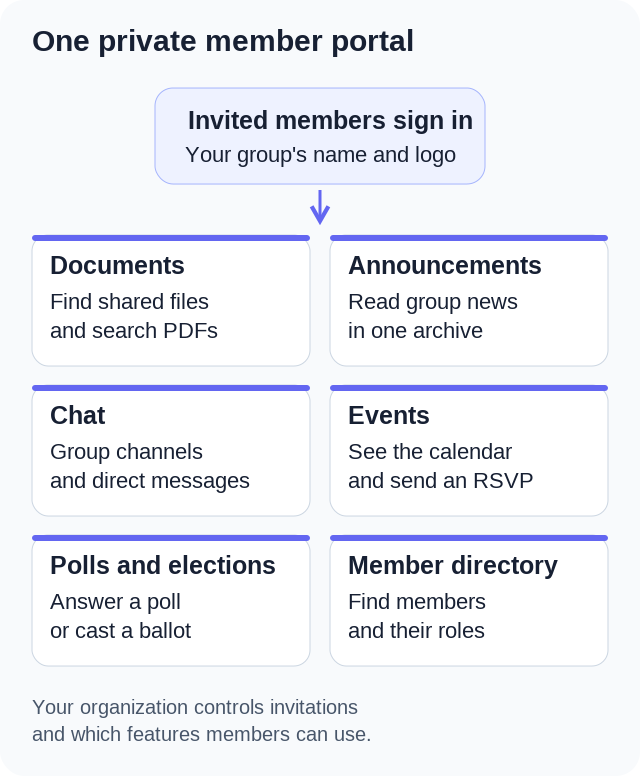
A member portal your nonprofit can actually afford.
Every plan starts with a 60 day free trial for up to 25 people. Verified 501(c)(3) nonprofits get 20 percent off. During the trial we load your files and member list for you. We also walk through your first vote with you, at no charge.
Updated .