How to run a nonprofit board election online
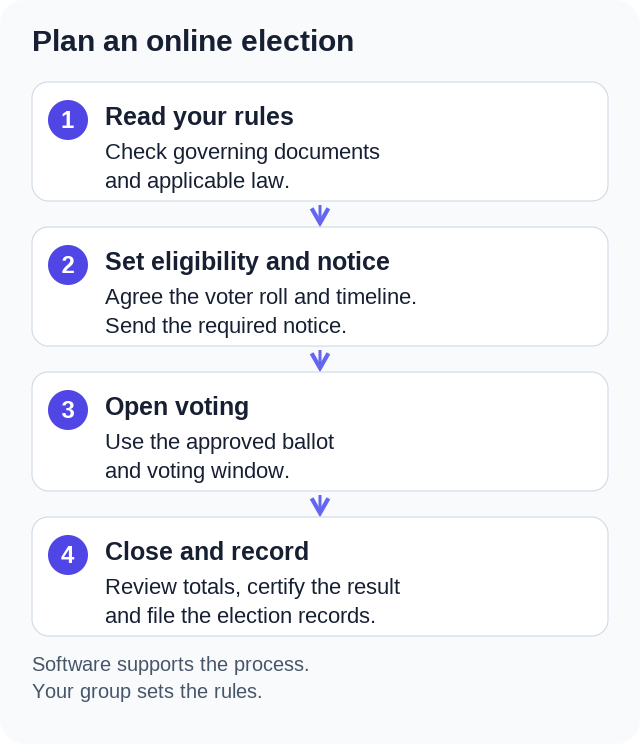
Run a nonprofit board election online by first checking who may vote, who may stand and whether your bylaws permit electronic ballots. Send nominations and election notice on the required schedule, give eligible members a private voting window, then record the count and certification. A voting app does not replace the governing rules.
Why board elections deserve more care than they get
Most nonprofit board elections are casual because most years are uncontested. A nominating committee proposes a slate, the annual meeting approves it, and everyone moves on. The trouble arrives in the year that is different: two candidates for one seat, a controversial merger on the horizon, or a founder stepping down. Suddenly the process that was never written down is the thing everyone argues about, and a small organization full of people who know each other has no good way to disagree in private.
The fix is to run every election, contested or not, with a process that would survive a contested one. This guide follows an online board election in the order it happens, from reading the bylaws to filing the packet.
Before anything is scheduled: read the bylaws
Nonprofit board elections are governed first by your own bylaws and articles, and by the nonprofit law of your state behind them. This guide is practical process, not legal advice; when the bylaws are ambiguous or silent, the answer comes from counsel, not from a blog.
What to extract from the bylaws before scheduling:
- Who votes. Membership nonprofits put board seats to a member vote. Many other nonprofits have self perpetuating boards, where the sitting directors elect the incoming ones. The mechanics below work for both, but the voter roll is completely different.
- Seats and terms. Staggered classes, term limits, and officer versus director elections all live in the bylaws, and a candidate recruited for the wrong class creates a mess that lasts years.
- Quorum and thresholds. What fraction must participate for the election to count, and what margin wins a seat.
- Notice. How far in advance members must be told, and by what channel.
During nominations: a process people can see
A fair election starts before the ballot. Publish the nominating committee's process and timeline, accept nominations through a channel anyone can use, require a consent to serve from every candidate, and post every candidate's bio in the same place members will later vote. In One Group Central the candidate bios, the meeting notice, and the ballot live in one private portal, so a member reads, asks questions, and votes without hunting through email.
Once the slate is set: the uncontested and contested paths
Write both paths down before you know which one you have. In an uncontested year, many bylaws allow election by a single motion or by acclamation, and if so, that is fine: record it in the minutes and be done. In a contested year the standard is a secret ballot, and for a multi seat class the ballot should say plainly how many choices a voter may make, with the system enforcing it. Ambiguity about vote for three versus rank your preference is where contested elections go wrong.
Before voting opens: settle eligibility and set a real voting window
Pull the eligible voter list from your membership records and resolve any disputes about standing before voting starts. In One Group Central the list is set when you create the election. New members are the exception: anyone who joins by invitation before the election closes is added to its voter list if they meet its group rule, so hold invitations during the vote or check each late joiner against your bylaws. Then keep the window open for days, not minutes. The single biggest difference between an in person election and an online one is participation: a ballot that waits patiently through a weekend reaches board members and members who could never make a Tuesday evening meeting, which makes quorum easier to reach. Send a reminder midway and another before close, and never share a running result.
If the annual meeting still misses quorum, your bylaws control, and most provide for adjourning and reconvening.
While voting is open: a ballot that is secret even among friends
Small organizations skip the secret ballot because everyone knows everyone, and that is exactly backwards. When the candidates are colleagues and friends, members need to vote their judgment without managing anyone's feelings, and losing candidates need to never wonder who was with them. Before choosing a tool, ask who can see a ballot and when; our guide to how anonymous online voting works explains the basics.
One Group Central encrypts each ballot before storing it, and administrators see only the totals. In a very small electorate a total can still give a choice away, for example when every voter picks the same candidate. Each voter also gets a receipt showing where their ballot sits in the election record. The other limit is us. Our software sees which member sent each ballot before it seals it, and we keep the keys that open the ballots at the count, so the secrecy is from your board and fellow members, not from One Group Central.
After the count: certify, announce, and file the packet
When an admin closes the election, the tally runs automatically. Announce the result with the participation number, thank every candidate by name, and record the outcome in the minutes. Keep the notice, the candidate materials, the eligible voter list, the tally, and the audit trail together in the board's document library. If a member, a funder, or an auditor ever asks how a director was seated, that packet is the answer.
County professional societies run a close cousin of this process; our guide to county society officer elections covers their nominating calendar and dues based eligibility.
Run your next board election in your own portal
One Group Central runs the board election in the same branded app as your document library, announcements, and chat, and each voter keeps a receipt.
Start your free trial One-page brief for your board (PDF)