Accessibility
What our apps support today, what they do not, and how to tell us when something is in your way.
1. Our position
One Group Central is a private member portal used by unions, homeowner associations, nonprofits, cooperatives, and professional associations. Some organizations publish it under their own name and logo; those apps are this platform with different branding, and everything on this page applies to them too.
Members do not choose this software. Their organization does. That makes accessibility a requirement rather than a feature: if a member cannot read a contract, open a ballot, or find out when the meeting is, they have lost access to their own organization. We would rather state plainly what works and what does not than publish a claim you cannot check.
2. Supported features
The accessibility features below are the ones we declare on the App Store for One Group Central, using Apple's names for them, and what each one means in practice.
- VoiceOver works because every button, link, text field, and toggle in the app carries an accessible name. The screen reader announces what a control does rather than reading it out as an unlabelled button.
- Voice Control uses the same names, so you can say "tap Documents" or "tap your profile" and the app responds.
- Larger Text: the app follows your system text size, including the accessibility sizes, and nothing in it overrides your setting. Screens are checked at 200 percent.
- For Sufficient Contrast, text and background colors are checked against contrast thresholds on every screen, in both light and dark appearance. Each organization sets its own brand colors, so this check runs against the theme rather than a single fixed palette.
- Dark Interface means a full dark appearance that follows your system setting.
- Differentiate Without Color Alone: status is never carried by color by itself. An unread document is marked with a dot and a heavier title, so the distinction survives color blindness and a grayscale display.
3. How we check
The accessibility claims on this page are tested rather than asserted. Automated checks run on every change to One Group Central, before it ships:
- Every screen is rendered in light appearance, dark appearance, and at 200 percent text, and each of those runs asserts minimum tap target size, that every tap target has a label, and that text meets contrast thresholds.
- A separate audit walks the accessibility tree of the member-facing screens, which is the same tree the operating system hands to VoiceOver, and fails the build if any interactive control has no accessible name.
The accessibility tree audit earns its place. The audit found a real defect: the profile button on the home screen had no name and announced as a bare "button". The defect was fixed before this page was written.
4. What we do not support yet
Listing the gaps is the honest half of an accessibility statement.
- The app does not read the system Reduce Motion setting yet, so screen transitions animate regardless of that preference.
- Captions and audio descriptions do not apply today, because the app contains no audio or video of its own. If your organization links out to a video, captions are controlled by whoever published it.
- Documents your organization uploads are the most common real barrier. A PDF that is a photograph of a page has no text in it, so a screen reader has nothing to read. We run optical character recognition on uploads to add a text layer, which makes most scans readable and searchable, but the result depends on the quality of the original scan. A document produced digitally will always work better than a photocopy.
- Focus order in some dialogs is unproven. Our automated checks confirm every control is named, but they do not yet prove that focus moves through every dialog and sheet in a sensible order.
5. If something is in your way
Tell us. An accessibility problem is a defect, and we treat it as one.
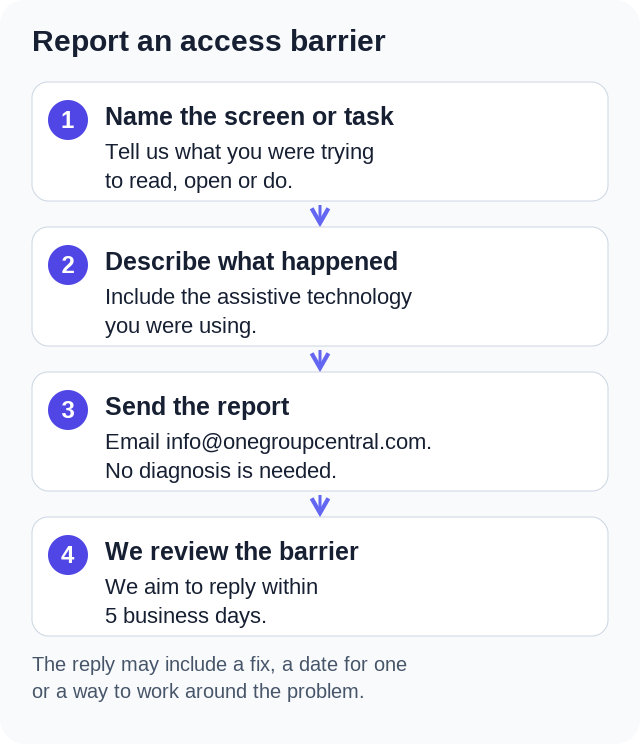
Write to info@onegroupcentral.com with the screen you were on, the assistive technology you were using, and what happened. You do not need to diagnose it or use any particular words. We aim to reply within 5 business days with either a fix, a date for one, or a way to work around it in the meantime.
If it is easier, your organization's administrator can report an accessibility problem on your behalf, and we will keep them in the loop.
6. Note for administrators
Some of what a member experiences is set by you rather than by us:
- Upload documents that were produced digitally where you can. A born digital PDF is readable by a screen reader; a photograph of a page is not, and depends on our text recognition to become readable at all.
- Write meaningful document titles. The title is what a screen reader announces in the list, so "Health Benefits Summary" is far more useful than "Scan 4".
- Check your brand colors. You choose your own theme, and a very light accent color on a white background can fall below contrast thresholds. If you are unsure, ask us and we will check it for you.
Reporting an accessibility problem
Contact us at info@onegroupcentral.com. We aim to respond within 5 business days.