Everything your local hands out, in one app
Put your contract, bylaws, benefits forms and retirement papers in one private library. Members can search it on their phones. Your news stays marked unread until each member opens it, so it does not get lost in email. When it is time to ratify a contract or elect officers, ballots are encrypted. Leadership sees totals only, and each voter gets a receipt to check.
From $49 a month for your whole local. 60 days free for up to 25 people, no card.
Easier than email, and closer to hand than a website.
Much of a local's work is answering the same questions about the contract, the salary schedule and the benefits forms. Right now the answers sit in email threads nobody can search. A portal puts them in one place your members already carry.
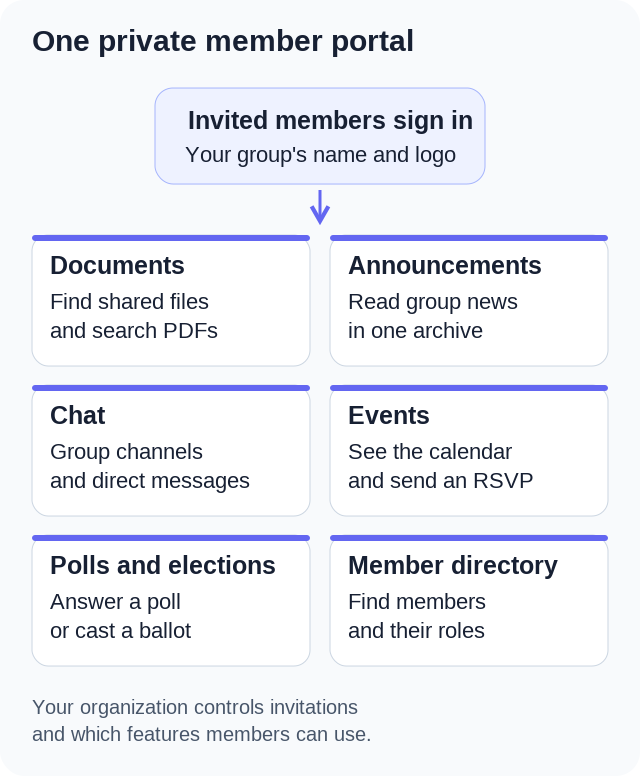
Every file in one place
Put the contract, constitution and bylaws, benefits and payroll forms, retirement letters and salary transfer forms in folders. Members can browse and search them. Scanned files become searchable on their own.
About documents →News that gets read
Send to the whole local or one building. Members get a push alert and an unread badge until they open it. A bargaining update no longer sinks under a pile of email.
About announcements →Ask the building rep
Members message officers and reps directly. No more guessing which email still works. A channel for each building or unit keeps the talk with the people it concerns.
About chat →Meetings and deadlines
Put general meetings, board dates and filing deadlines on one shared calendar. Members can add it to their own phone's calendar.
About the calendar →Buildings and units
Sort members by building, job site or bargaining unit. Then send a file, a notice or a ballot to just the members it fits.
About members →Private member files
Files with members' personal details are each encrypted on their own. Only the officers you allow can open them, and views are recorded in the audit log.
About the vault →Every local vote type in one portal.
The portal is what members open every week. The ballot is when they most need to trust it. Mailed ballots are slow, and in-person votes leave out shift workers. So the ballot goes on every member's phone, and leadership gets the totals once the vote is tallied.
Ratify the contract
Post the tentative agreement in the document library. Members read it in the portal and vote yes or no. Once the vote is tallied, leadership gets the yes and no totals, with no names attached.
How it works →Elect officers
One seat or several. Members can pick up to the number of open seats. Each member account gets one ballot, and it is encrypted before it is stored.
Strike votes
A big vote, run in the same place as your bargaining news. Send the notice and reminders as announcements. They reach every member by email and push.
Bylaw changes
Post the proposed text in the document library. Run the change as a yes or no vote. You get the counts to check against the threshold in your constitution.
Steward and shop elections
Run a ballot for one shop or one yard. Only members assigned there can vote. You get local results without a local meeting.
Member polls and survey preview
Before bargaining, use a quick poll to check priorities, meeting times or top grievances. A poll is not binding. It can hide who answered from your admins. Named surveys with many questions, saved progress and separate results groups are in release preview, not yet deployed.
See the survey preview →APPR files and the school year.
In New York, APPR is the Annual Professional Performance Review, the state's evaluation system for teachers and principals. A teachers local often hands out the district's APPR plan, the rubric and the timeline alongside the contract. Give them their own folder and share it with the members it covers.
Send a building update to one school at a time by putting members in a group for each building. If the district publishes its calendar as a link, an admin can add it to the shared calendar, and the dates update on their own.
How a local vote runs.
The election committee sets up the ballot
Write the question. Choose who can vote: the whole local, or groups such as a craft, a yard or a shift. Set when voting opens. Voting closes when an admin closes it.
You announce the vote to members
Turn on Send announcement to members when you create the ballot. When voting opens, the members it is for get an email with a link to it. That announcement goes by email only. Send a separate announcement when you want a push alert or a reminder. The portal carries your local's name. Members sign in with their email and password. Optional two factor sign-in adds a second check.
The ballot is encrypted and recorded
The member's choice is encrypted before it is stored. A second vote from the same account is refused. Each ballot is added to the end of the election record. The voter's receipt is saved in the app on the phone or computer they used.
Mailed ballots and show-of-hands votes can't solve this.
48 hrs
Keep a ratification vote open around the clock. Every shift can vote by phone instead of coming to the union hall.
1 receipt
Each voter gets one receipt. It shows where their ballot sits in the election record, and nothing on it shows the choice.
0
Names next to choices in any result leadership can open. Officers get the totals, not the ballots.
Learn how to run better union votes.
Plain English guides for presidents, stewards and boards.
How to Run a Ratification Vote Members Trust
The tentative agreement, the notice, the vote and a receipt each voter can check.
Strike Authorization Votes
The rules, the thresholds and secrecy. Plus why turnout matters as much as the margin.
The Steward's Guide to Communication Apps
What a union app must do, the trap of an app that only sends news, and what a fair price looks like.
Union Voting Apps Compared
Six options side by side, with published prices where they exist.
LMRDA Union Election Rules in Plain English
What federal law requires, which locals it covers, and where online voting fits.
How Anonymous Voting Works
How encrypted ballots and receipts work, in plain English.
One Group Central vs. UnionConnect
Prices and features side by side, with published sources.
Frequently asked questions
Does the LMRDA permit electronic voting for union officer elections?
First check whether the LMRDA applies to you. The Department of Labor states that OLMS has no jurisdiction over unions representing solely state, county, or municipal employees. So a local made up entirely of public school employees is generally governed by its own constitution and bylaws rather than LMRDA Title IV. Where Title IV does apply, it requires a secret ballot. The law defines that at 29 U.S.C. 402(k) as a choice expressed "by ballot, voting machine, or otherwise, but in no event by proxy" and cast so the person cannot be identified with the choice expressed. The statute names no technology. The Department of Labor's interpretive regulation at 29 C.F.R. 452.97 treats voting machines as an accepted method, so the test is the outcome rather than the medium. One Group Central encrypts ballots but is not certified as LMRDA compliant. The next answer covers who can connect a member to a ballot. Statutes checked September 8, 2026. This is general information, not legal advice: confirm your election plan with counsel or the OLMS before changing methods.
Can union leadership see how members voted on a contract?
Not by name. Officers see the totals for each choice, and only after an admin tallies the vote. At that point every eligible member sees the totals too. A total can still give votes away. If every member of a small unit votes yes, everyone knows how each of them voted. Secrecy from us is a separate question. Our servers receive each ballot with the member's identity before encrypting it. We also hold the key that opens the ballots until the count is done. So a ballot is not sealed against us as the operator. Read the election privacy details.
How do shift workers vote if they can't attend meetings?
Turn on the announcement when you set up the vote. Members then get an email with a link to the ballot when voting opens, even for a vote you schedule to open later. A separate announcement adds a push alert for members who use the mobile app, and works as a reminder. Members can vote on any phone, tablet or computer. The election stays open until an admin closes it, so you can match the window your election rules require.
What if a member challenges the count?
The receipt a member sees after voting stays in the app on the phone or computer they voted from. Verify my vote there confirms their ballot still sits in the election record at the spot it was given. Signing out or clearing the app's data deletes that saved receipt. The check is not a recount. The totals are counted on our servers when an admin tallies the vote. The key that opens those ballots is destroyed in the same step, so they cannot be counted a second time. Only signed-in members the vote was for can read the election record. A dispute still goes through the challenge process in your constitution and bylaws.
Run your next local election the right way.
Free 60 day trial for up to 25 people, and we raise that if your committee needs more. Pay yearly and Growth is $79 a month for up to 300 members, billed as $948 once a year. During the trial we load your member list and contract files for you. We also walk through your first vote with your election committee, at no charge.
Updated .