One place for the documents members keep asking for
Keep bylaws, minutes, contracts and forms in one private library. Members find and read them in the app, scanned pages become searchable on their own, and you choose who can open each file.
60 day free trial for up to 25 people. No credit card. Leave any time and take your member list and vote records with you, free.
Published: . Last updated: .
Find the document without asking the secretary
Members ask for the same files again and again. Put bylaws, minutes, contracts and forms in one private library, and they can find them on their own. You sort files into categories, members search and read them in the app, and you choose who can open each one.
Set it up your way
You set up categories, which work like folders, such as Bylaws, Minutes, Financials or Forms. Then you upload files into them. Files go straight to storage, so large files do not have to pass through our server first. The app keeps each file's size, type and a fingerprint of its contents.
You choose who sees each file. It can go to all members or to admins only. You can also send it to certain groups. That way a committee's working papers reach the committee and no one else.
You can rename a file, move it to another category, or change its description at any time. You never have to upload it again.
Scanned pages become searchable
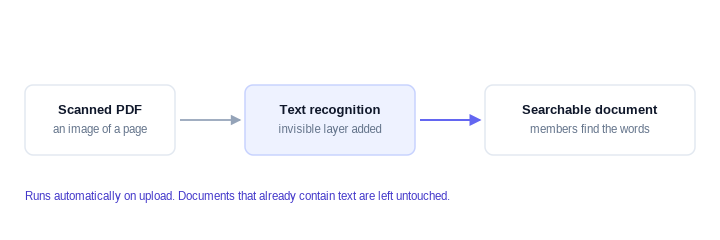
A scanned PDF is just a picture of a page. A search finds nothing in it, because there is no text to find.
When you upload a PDF, the app reads the text on scanned pages for you. Files that already have text are left as they are. A minute or two later, members can search the scan like any other file.
Read without downloading
Members open PDFs right in the app. They can search the text, jump from match to match, select text and copy it.
You can also name the people in charge of a file, one by one or as a whole group. Then a member reading it can select a passage and send a concern straight to those people, with the passage included.
The document list has a "Recent updates" summary. It shows the newest upload date and the files you have not read, in your current search and category. "Show newest" sorts that view by upload date. Neither one marks files as read or shows edit history.
Use cases
Draft minutes for a committee should go to that committee's group before you publish them. Approved minutes for all members can go to everyone. A category only sorts the list. It does not decide who can open a file. Scans of IDs belong in the separate encrypted vault, not next to minutes.
Check scanned text before you rely on it. A clean scan can still misread a date or a name, so search does not replace reading the page. If the file is not a PDF, the app does not read its text. Give each file a clear title and description so members can find it by topic too.
- Bylaws and rules members can search instead of request
- Past meeting minutes, including old scanned minutes
- Contracts and agreements members voted to approve
- Committee papers shown to the committee only
- Forms members need to download and return
Read about searchable text and file fingerprints
The W3C PDF OCR technique shows how real text is added to a scanned page. NIST's Secure Hash Standard defines the fingerprint used to compare files. Searchable text and a matching fingerprint answer different questions. Neither one proves a document is right, that it reached the right people, or how long this app takes to read it.
References checked October 12, 2026. This date is when we checked the links. It is not a date of human or expert review of this page.
FAQ
What file types can we upload?
You can upload PDF, Word, Excel, PowerPoint, plain text, CSV, common images (JPEG, PNG, GIF, WebP) and zip files. The app reads text only in PDFs, since that is where scanned pages most often end up.
Why can I not find text in an old scanned document?
The scan may have been uploaded before text reading ran, or it may not be a PDF. Either way there is no text to search. Upload the file again and the app will read it.
Can we hide a document from most members?
Yes. Set the file to admins only, or send it to one or more groups. Members outside those groups do not see the file at all.
See it in your own organization
60 day free trial for up to 25 people. No credit card. Leave any time and take your member list and vote records with you, free. Every plan includes every feature.