A vault for the documents you should not store casually
Keep ID copies and other sensitive files in an encrypted vault, not in email or a shared drive. Each file gets its own key. Owners and admins open files in a secure viewer, and deleting a file removes its live key. Older backups keep keys until they expire.
60 day free trial for up to 25 people. No credit card. Leave any time and take your member list and vote records with you, free.
Published: . Last updated: .
Check who should be able to read the file
Every owner and admin in your organization can open files in the vault. Before you upload a file, make sure that is right for it.
The vault cannot limit a file to the person who uploaded it. It cannot let you pick certain people to see it either. If only you and a few chosen people should read a file, do not put it in this vault.
The vault is for things like ID photos and sensitive PDFs. Each file gets its own key. Owners and admins open files in a secure viewer, not through a link someone could pass on. The app tries to log each time a file is opened. Deleting a file removes its live key and asks storage to remove the file.
Older database backups keep keys until those backups expire.
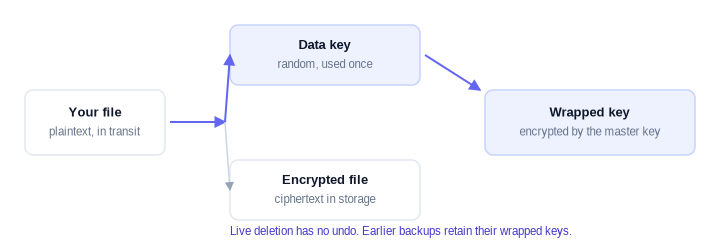
Files are encrypted, but the server still holds a key
A file sent to the vault is encrypted before it is stored. Each file gets its own random key, used for that file only. That key is itself locked with a master key kept in the server's settings. Only the locked form is ever written down. Someone who gets hold of only the storage cannot read the file without the keys.
Opening a file checks access again
Vault files do not use the share links the rest of the app uses. The viewer asks our server for the file. The server checks who is asking at that moment, before it opens the locked file. It also tells the browser not to keep a copy.
The app shows PDFs and images from memory. It has no download or export button. That limits what the app lets people do. It does not promise that a browser or phone keeps no data, or that no one takes a picture of the screen. Taking away access stops the next request. It cannot pull back a file that is already open on someone's screen.
The app tries to log who opened the file and from what IP address. If the log fails, the file still opens. So the log may miss some views.
What deleting a file removes
When you delete a vault file, the app marks it inactive and removes its key from the live database. There is no undo.
Deleting cannot pull back a file that is already open on someone's screen. A file someone already opened or captured is out of its reach.
Older database backups keep past keys until they expire. Deleting a live file does not mean every old copy is gone.
The file's record stays, without the live key, along with a log entry for the delete. The app then tries to remove the locked file from storage. If that cleanup fails, the key still stays gone.
A time limit for keeping vault files can also be set. Once an hour, the app removes the keys of files past that limit, so files that should not be kept forever are not.
Changing the master key
The master key can be changed without touching any stored file. A maintenance step locks each file's key again with the new master key. The files themselves stay as they are. An operator has to manage the old keys and check that the change worked. Changing the active key does not on its own retire every old key or old backup.
Note: by design, the server can decrypt vault files for people allowed to view them. The vault protects stored files when the keys are kept apart. It checks each new request to view a file, and it removes the live key when you delete a file. It is not a zero knowledge system, and we do not call it one.
Read about encryption and key handling
NIST SP 800-38D defines GCM, a kind of encryption with a built-in check. OWASP's cryptographic storage guide covers how to handle and store keys, and the risks. These explain the ideas behind the design. They are not a security review of One Group Central. Server access and old backups are still part of what you have to trust.
References checked October 12, 2026. This date is when we checked the links. It is not a date of human or expert review of this page.
Plan and provisioning
The vault comes with every plan. Its key has to be set up on the server when your account is set up. Plan storage limits still apply. For file types and how to upload, use the sensitive vault Help guide.
See it in your own organization
60 day free trial for up to 25 people. No credit card. Leave any time and take your member list and vote records with you, free. Every plan includes every feature.