Reach every member on the channel they actually check
Write one notice and send it by email, push and optional text at once. It also waits in the app, so urgent news does not depend on who opens email.
60 day free trial for up to 25 people. No credit card. Leave any time and take your member list and vote records with you, free.
Published: . Last updated: .
Send the same notice through the app and email
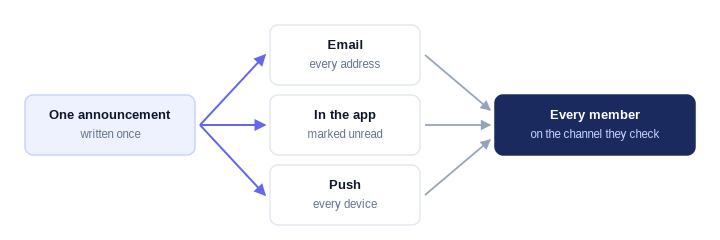
You write a notice once. One Group Central puts it in the member app and also sends it by email, phone push and, if you pay for it, text. You pick who gets it, preview the text and files, and send it now or set a time.
Email and text limits apply. A member getting a message does not prove they read it.
Write it once
You write the notice in an editor with headings, lists and links. A preview tab shows just what members will see. The email is built from the same text, so what you saw is what lands in inboxes, under your organization's name.
You choose who gets it: all members, or one or more groups. Your choice applies to every channel at once. So a note meant for the finance committee does not reach anyone else by another route.
You choose when it goes out: now, or at a set time. The app holds a scheduled notice and sends it on time by itself. You can cancel it any time before it goes.
Where it arrives
- Email to every member with an address on file
- A text, if your organization has the texting add-on and the member gave you a phone number. Shift workers, trades and anyone away from a computer often read a text when they will not read an email. On a vote that needs a quorum, that can decide whether you need another meeting. Texting is off until an admin turns it on. Members can stop texts at any time by replying STOP.
- A push alert on every device a member has signed in on, with the unread count on the app icon
- The list of notices in the app, marked unread until the member opens it
Notices go out in batches. Mail services, phone settings and member contact details still affect whether a message gets through. The unread badge shows whether a member opened the notice in the app. It does not prove the notice reached them on every channel.
Files and categories
You can attach files to a notice, uploaded the same way as documents and sent with the message. You can also sort notices into categories you name, each with a color, so the list stays easy to scan as it grows. Members see an unread badge until they open each one.
Every notice has a named owner. By default that is the sender. A member reading it can start a private chat with that person about it. That keeps questions out of a reply-all thread.
Use cases
- Meeting notices with the agenda attached
- Reminders that a vote is open
- Urgent building, worksite or weather notices
- Newsletters filed under a regular category
- Committee updates sent to one group
Limits on every send
Each notice can carry up to 10 files. Texting has its own monthly limit for each plan: 100 texts during the free trial, 400 on Starter, 1,200 on Growth, 2,000 on Plus and 4,000 on Enterprise. One text to one member counts as one. If a send would go past the month's email or text limit, the whole send is turned down before anything goes out.
The app tracks each text after it leaves us. Each text starts with your organization's name. If a phone company turns one down, that member's text is marked failed, not sent. Admins need the Send / Publish Broadcasts permission to send. Owners can always send.
Why an email can still miss an inbox
Gmail's sender guidelines explain what mail services check before they deliver. Twilio SendGrid's domain authentication steps explain how a sender sets up DNS. Neither one makes every notice reach an inbox or get read. When a notice matters, check the member's real address, your sending domain and your plan's limit.
References checked October 12, 2026. This date is when we checked the links. It is not a date of human or expert review of this page.
FAQ
Do members need the app installed to receive announcements?
No. Email reaches everyone with an address on file. Push alerts are an extra for members who have the app.
Can we send a test to ourselves first?
Use the preview tab to see how the notice will look before you send it. If you want time to think it over, set a send time instead of sending now.
Is there a limit on how many we can send?
Each plan includes 60 emails a month for each member at the plan's member limit. That is 6,000 a month on Starter. Your current use is shown on the billing screen.
See it in your own organization
60 day free trial for up to 25 people. No credit card. Leave any time and take your member list and vote records with you, free. Every plan includes every feature.