Give members somewhere to talk that you actually control
Give your members one private place to talk, right next to their documents and events. Channels, direct messages and replies stay in your own portal, not on a social network you do not own.
60 day free trial for up to 25 people. No credit card. Leave any time and take your member list and vote records with you, free.
Published: . Last updated: .
Talk in your own private portal
Members chat in the same app where they read documents and check events. You get one home for member talk, and you set the rules. Members can share files, react to posts and save a message to find later. Admins look after the shared channels. Any member can block someone or report a message.
How is chat set up?
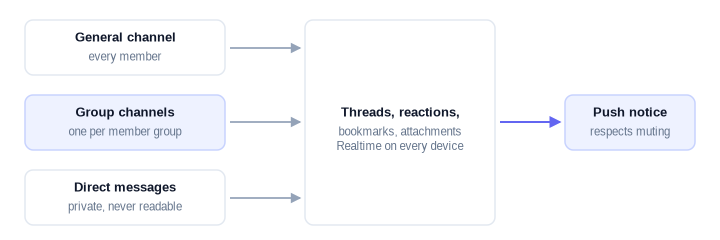
Every organization gets a General channel that all members can see. Each member group also gets a channel of its own, made for you. So the committee has a room the first time it needs one. Admins can add more channels and limit each one to certain groups.
Members can send direct messages to each other. If you prefer, you can limit direct messages to chats that include an admin. Members can still reach their leaders that way, but not each other.
Members can reply in a thread, react with an emoji, and edit or delete their own posts. One quick reaction uses your own organization's icon. Members can also bookmark a message. Only they can see their bookmarks.
Files and phones
Members can attach a file, pick a photo or take one with the camera. Photos show right in the chat. Chat works in the browser and in the app on phone, tablet and computer. Members get push alerts for new messages, and the Chat tile counts what they have not read. Each member can turn those alerts off in their profile.
A weak signal will not lose a message. If the connection drops, the message waits and sends itself when the connection comes back.
Moderation without reading private chats
Admins can rename, archive and delete channels. They can also remove one post from a shared channel. Any member can report a message.
Direct messages stay private. A report is the only way a message can be brought up for review, and each review is logged. There is no tool to browse member chats.
A private group still needs a plan for abuse. Apple's user-generated content guidelines call for reporting and blocking. Google Play's policy treats reporting in closed member apps and blocking in direct messages as separate needs. Decide who handles reports, and tell members how to reach that person. These rules set what app stores expect. They do not let an admin read private chats.
What belongs in chat, and what does not?
Use a committee channel to talk things over. Use an announcement for an official notice. A busy chat does not replace the final proposal, the minutes or a vote result. Keep those in their own part of the portal. A bookmark only helps the member who saved it. It does not share the message or record a decision.
Archive a finished project channel when its history is worth keeping. Deleting a channel removes its messages. If you delete a group's own channel, an empty new one takes its place. Read the channel steps before you clear a chat.
- A General channel in place of a social network group
- Board and committee channels, one made for each group
- Member questions to leaders, with no reply-all thread
- Teamwork during an event, a campaign or an incident
Blocking and the word filter
Any member can block another member. A block works both ways, so neither person sees the other's posts. Any direct message between them drops out of both lists, and new ones are refused. The blocked member is not told.
A block covers person to person contact only. Announcements, documents, elections, polls and events still arrive. So a personal fight cannot make a member miss an official notice.
Chat also checks each post against a short list of severe slurs and swear words before it goes up. The same check runs when a post is edited. The list is short on purpose. Words a member needs to report a problem, such as harassment or assault, still go through. Blocking those words would stop people from saying what happened to them. A message can be up to 8,000 characters long, and a report can give a reason of up to 2,000.
Who can do what in chat
You set chat access for each member with two switches. View chat lets a member read channels and report posts. Use chat lets them post, react, attach files and start direct messages. Turn off the second one and the member can read but not post.
Admins with the Manage Chat Channels permission run the shared channels and can remove posts in them. The General channel has its own switch in Settings. Turn it off if you only want group channels, and the rest of chat keeps working.
Platform support staff can see chat only through a member's report. Each time they read one, the platform audit log records it.
An example from a union local
A teachers union local might use General for building news. Each building's rep group gets its own channel. A bargaining channel is limited to the bargaining team. A member who wants to ask the president something in private sends a direct message. If the local wants member questions to go to officers only, it limits direct messages to chats with an admin. This is an example of the options, not a real customer.
FAQ
Can leaders read private messages?
No. Direct messages are private. A message is looked at only after a member reports it, and that review is logged.
Can we turn chat off?
Yes. Chat has its own on and off switch for your organization. You can also give a single member read only access.
What happens to a group channel if the group changes?
Group channels follow the group. Add someone to a group and they get its channel. Remove them and they lose it.
See it in your own organization
60 day free trial for up to 25 people. No credit card. Leave any time and take your member list and vote records with you, free. Every plan includes every feature.