Release preview
Ask one question or collect a fuller picture
Get quick feedback from members with polls inside your portal. Longer surveys with written answers, ratings and separate groups for answering and reading results are a release preview, not yet deployed.
Release preview. Availability follows deployment.
Published: . Last updated: .
Keep feedback inside your membership
Polls let you ask members a quick question and see the answers in one place. A release preview, built for the next release but not yet deployed, adds longer surveys. A survey can take written answers and ratings, and members can save it and finish later. You can also pick one group to answer and another to read the results.
Release preview: Multi-question surveys and the new owner and group controls are built for the next release. They are not yet deployed. This page describes that release.
Use a poll to gather views. Use the separate election tool when you need a formal ballot with a receipt.
Pick a quick poll for one question, or a survey for several questions answered together. A survey can mix choice questions, written answers, ratings, numbers, dates, ranking and a grid of related questions.
Decide who answers and who reads results
Only admins can create a poll or survey. Each one has an owner who is in charge of what it asks and who sees it. The owner and the organization's owners manage it. They can hand it to another eligible admin when duties change.
The people who answer and the people who read results are set apart. You can ask a committee for views and let the board read them, even if board members do not answer. Leave the list of who answers empty to ask all members. Results stay with the owner and the organization's owners until you pick groups to share them with.
Give members time to finish
Survey pages break a long survey into short sections. Required answers and simple checks catch forms that are not finished. A follow-up question can show only when an earlier answer calls for it.
Members can save a survey and come back later. The owner decides if members can change a survey after they submit it, while it is still open. Drafts, a preview, open and close times, and a copy button help you run the same survey again.
Read the answers in context
Survey results group the answers by question. People allowed to see results can read each submitted answer and download the data as a CSV file. A saved survey that is not finished does not count.
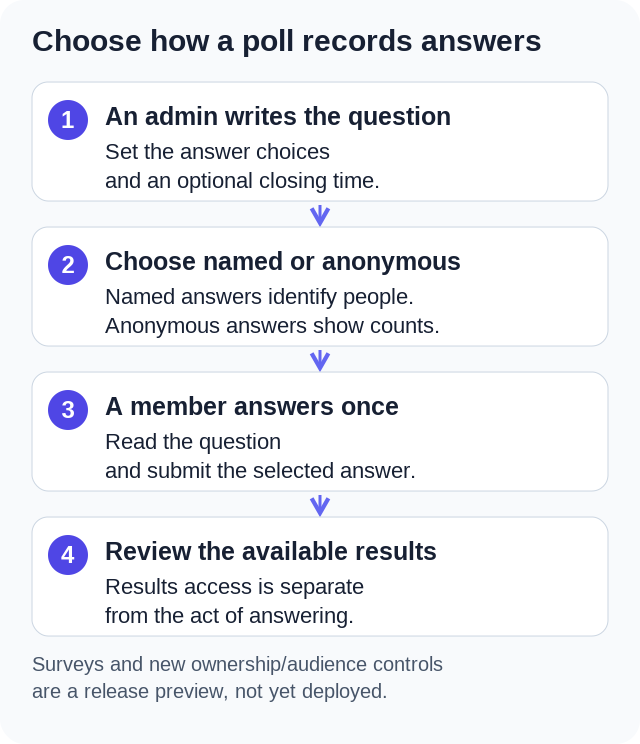
Quick polls keep the count for each choice. Named polls also keep who answered what and how each group took part. Anonymous quick polls show only the counts, with no list of names. The service still receives the account that answered. So an anonymous poll is not a promise of secrecy from us, the company that runs the service.
Which format fits a committee decision?
Use a quick poll to pick a meeting time or check a simple preference. In the release preview, use a survey to collect a rating and a written reason together. A survey records which member answered, so they can save and edit. Do not call a named survey a secret ballot. And do not pick the preview for a job that must run today.
For a binding decision, first settle who can vote, how notice goes out, the voting method and the records you need. The election tool has its own encrypted ballot and receipt check. Its page covers what we as the operator can see and the limits on recounts. Neither polls nor surveys decide whether your rules allow a given voting process.
Question wording changes the answers you get. Pew Research Center's guide to writing survey questions shows how wording, and asking two things at once, can change answers. The US Census Bureau's questionnaire standard requires its surveys to be tested with the people meant to answer them and improved before use. Do the same for a committee survey. Ask a few members to say what each draft question means before you publish it.
Limits and rules worth knowing
Each member can answer a quick poll once. A poll can allow one choice or several. A member who has answered cannot answer again. An admin can set an end time, after which the poll takes no new answers, or close it early. Closed polls keep their results. Once anyone answers, the poll's title is locked, so the question people answered stays the one on record. You can also send an announcement to members in the same step as making the poll.
Surveys in the release preview hold up to 100 questions. A title can be up to 255 characters, and a description up to 10,000 bytes. The question types are short text, long text, single choice, multiple choice, dropdown, rating, Net Promoter Score, number, date, matrix and ranking. Questions lock when a survey is first published. To change the design, the owner copies the survey into a new draft. Only a draft that was never published can be deleted. A survey moves from draft to open to closed, and a closed survey can be archived.
Survey results in the preview count submitted answers only. If a results view or download covers more than 10,000 submissions or 32 MB of answers, the reviewer is asked to narrow the filters first.
An example of a survey in practice
Once the preview ships, a teachers union local planning its contract goals could send a survey to its building reps group. The survey ranks six bargaining topics, asks how satisfied members are with class sizes now, and asks for a written comment. Reps save their progress and finish later in the week. The bargaining committee is set as the results group. So the committee reads the summaries and downloads the CSV without being asked to answer. This union example shows how the tool is meant to work. It does not report any local's use.
FAQ
Where do surveys appear?
Inside Polls. Members have no separate survey account or menu to learn.
Can participants always see results?
No. Answering and reading results are separate permissions. A member may be allowed to answer, see results, do both or do neither.
Are multi-question surveys anonymous?
No. Surveys record which member answered, so members can save their progress and, if allowed, edit their answers. Use an anonymous quick poll when that format fits the question.
Is a survey an election?
No. Polls and surveys collect feedback. Elections have their own voter list, ballot and receipt. Review the election safeguards when you plan a formal decision.
Can I change a survey after members start answering?
A published survey keeps its questions fixed, so every answer matches the same wording. Copy the survey to start a new version as a draft.
Can a quick poll run until a set date?
Yes. Give the poll an end time and it stops taking answers at that moment. An admin can also close it early, and the results stay available afterward.
See the release preview
Release preview. Availability follows deployment.