One calendar members can actually subscribe to
Put meetings and events in front of all members or just one group. Members answer Going, Maybe or No in the app, and they can see your events in the calendar app they already use.
60 day free trial for up to 25 people. No credit card. Leave any time and take your member list and vote records with you, free.
Published: . Last updated: .
Put meetings where members already look
You post a meeting once, and members see it in the app and in their own calendar. You can show an event to everyone or to chosen groups. Members answer Going, Maybe or No. You can set up repeating meetings, bring in schedules you already have and see who is coming.
The app does not work out quorum from RSVPs, and an RSVP count does not prove one.
How do events work?
Admins add an event with a title, a date and time, a place and a short note. An event can last all day, and it can be limited to certain groups. Members see the events meant for them and answer yes, no or maybe. Admins see a list of who answered and how. So planning seats or food means reading one screen.
Members can see the calendar as a list by date, or as a day, three day, work week, week or month view.
An event can carry an alert, like in Apple Calendar. The person who makes the event picks when it goes off: at the start, 30 minutes before, a day before, or up to a week before. When it goes off, each member who can see the event gets a push alert. The red unread badge also comes back on their Events tile. A member who wants quiet can turn event reminders off in their profile.
The meeting that happens every week
Much of what goes on a calendar repeats. Set the repeat once and every meeting appears: every Wednesday, every other Thursday, the third Tuesday of the month, or the same date each year. End it on a date, after a set number of meetings, or leave it running.
Real life needs exceptions, and the calendar allows them. Cancel the week of a holiday and the rest of the series stays put. Move one meeting to a new hall and only that one moves. Change the place from now on and every later meeting follows. The meetings that already happened stay as they were, since they are the record of what you did.
Repeats follow your organization's own time zone. So a 7:30 PM meeting stays at 7:30 PM when the clocks change, instead of moving by an hour for half the year.
Does it work with the calendar members already use?
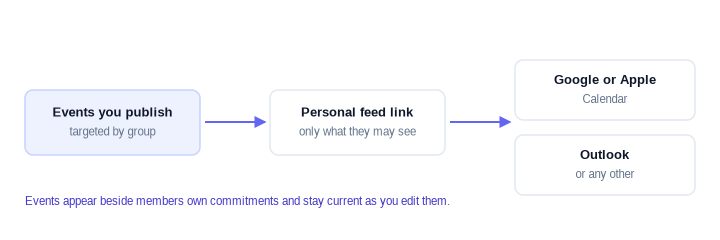
Yes. Each member gets a personal link with one tap buttons for Apple Calendar and Google Calendar. There is also a link to copy for Outlook or any other app that reads a calendar feed. Your events then sit next to the member's own plans and stay up to date as you change them. The feed holds only the events that member is allowed to see. If a member shares the link by mistake, one tap resets it and the old link stops working.
Schedules can come in the other way too. Admins can import a calendar file. They can also subscribe to an outside calendar link, which the app checks and refreshes on its own. That helps when a parent body or a venue posts a schedule you need to copy. A repeating meeting in that file comes in as a repeat, and the weeks the publisher cancelled stay cancelled.
Turn a paper schedule into events
Schedules often show up as a photo or a printed sheet: a season calendar, a shift list or a handwritten note from a meeting. An admin can take a photo of it, and the app reads the text and suggests events. The admin checks each one, edits or drops it, and adds the good ones in one step. Nothing is saved until an admin accepts it.
Keep photos after the event
The Event gallery keeps photo albums that can link to a calendar event. An album has its own viewers and its own editing team. The event and the album each choose their own audience. Deleting the event leaves the album and its photos in place.
Use cases
- Annual and monthly meetings, with a count of who is coming
- Committee schedules shown only to the committee
- Social and volunteer events with RSVPs
- A copy of a parent organization's posted calendar
Read about calendar subscriptions
RFC 5545 defines the iCalendar format that calendars use to share events. Apple's calendar subscription instructions show how to add a feed to Calendar. A subscription and a one-time import do different jobs, and the calendar that receives the feed decides how often to refresh it. These documents do not set your meeting notice or quorum rules.
References checked October 12, 2026. That date is when we checked the source links. It is not a human or expert review of this page.
FAQ
Do members need to check the app to see events?
Not if they subscribe. Their personal feed puts your events in the calendar app they already use, and it stays up to date on its own.
Can an event be limited to one group?
Yes. Pick one or more member groups for the event. Members outside those groups will not see it.
What happens if we edit an event after people have responded?
The event updates in place and the answers are kept. So you can fix a time or a place without asking everyone again. One exception: if you change how a series repeats, its later meetings are rebuilt and their answers are cleared. The app warns you before that happens.
See it in your own organization
60 day free trial for up to 25 people. No credit card. Leave any time and take your member list and vote records with you, free. Every plan includes every feature.