How to run a union ratification vote members trust
A union ratification vote asks eligible members to accept or reject a tentative agreement. Give members the agreement, a plain explanation of changes and time for questions before opening the ballot. Follow your constitution's notice, eligibility and approval rules, protect ballot secrecy, and record the count and how the result was certified.
Why ratification votes get challenged
A contract ratification is the highest stakes vote a local runs. Members are voting on their own wages and working conditions, feelings run hot, and the losing side looks hard at the process. The classic version, paper ballots at a gymnasium meeting, gets challenged for the same reasons every time: members who could not attend, ballot boxes handled by people with a stake in the outcome, and a count nobody outside the room can check.
Running the vote online fixes who can get to the ballot. Trust in the count still depends on the system's safeguards and on your procedure, so this guide walks the whole process.
Before the ballot opens
Know your obligations before you schedule anything
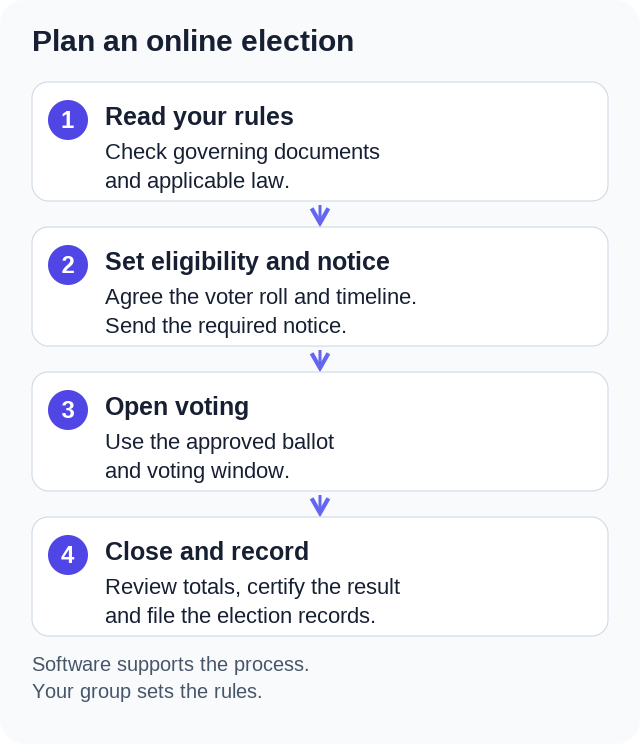
Ratification procedure lives in your local's constitution and bylaws, and often in the parent union's rules as well. Read them for: who is eligible to vote, what notice the membership must receive, whether the ballot must be secret, and any quorum or approval threshold. If your parent union must approve electronic voting, get that in writing first. Then adopt the electronic procedure by executive board resolution so the method itself is on the record before the first ballot is cast.
Publish the tentative agreement where members will actually read it
A ratification vote members trust starts with members who have read the deal. Post the full tentative agreement and a plain language summary in the same portal that will run the vote, so a member reads the contract, asks questions in chat, and casts a ballot in one place. Announce it through every channel: email and push notification. Hold the question and answer period before the ballot opens, not during it.
Build the eligible voter roll
Eligibility disputes sink ratification votes. Export the members in good standing list and reconcile it against recent hires, retirees, and dues status before the ballot opens. Then plan for late joiners, because One Group Central does not hold the roll still: a member who accepts an invitation while the election is a draft, scheduled, or open is added to it automatically if they are in its audience. If your rules fix the roll when voting opens, hold new invitations until the vote closes, and check anyone who joined during the window against your eligibility rules.
Review the ballot privacy safeguards
Before you schedule the vote, read how ballot privacy works and where it stops. No one at the local can open a member's ballot. Officers get the totals, and only once an admin closes the vote, at the same moment every eligible member does; on a small unit that votes one way, those totals alone show how each member voted. The ballots are not sealed against us, though: our servers receive each one together with the member's identity before encrypting it. Read the election privacy details.
While the ballot is open
Keep the ballot open long enough for every shift
The quiet disenfranchisement in union votes is scheduling: a meeting vote excludes whoever is working that night. Keep the online window open at least 48 hours so nights, weekends, and doubles all get a real chance. Send a reminder at the halfway mark and another a few hours before close. Never share a running result. The app has no live turnout count while voting is open, so give members the number of ballots cast once the vote is closed.
Members without smartphones can vote too. The ballot works in a web browser, so a private voting station at the union office can help members use their own accounts. If paper voting is required, adopt a separate procedure that reconciles eligibility and participation across paper and online ballots, prevents duplicate voting and protects ballot secrecy before certifying combined results. One Group Central does not provide integrated paper-ballot reconciliation; do not simply add the two totals.
After the count
Close, review, and share the result
At the announced deadline, an admin closes the election, since it does not close itself. Closing decrypts and counts the ballots once and destroys the key that opened them, so there is no later recount from the stored ballots. Review the totals and the number of ballots counted under your adopted procedure before certifying the result. A receipt lets its holder match an entry hash and position in the election record, which only signed-in members can see; it does not independently prove that the selection was encrypted or tallied correctly. Independently saved receipts and roots can help identify later changes to that record. A chain and root supplied by the same service do not rule out a consistent rewrite or prove an honest tally.
Members can check that their own ballot is recorded. On the device they voted from, Verify my vote compares the receipt the app saved with the entry hash and position in the election record, as long as they have not signed out or cleared the app's data since. That confirms their ballot is recorded, not that it was encrypted or counted correctly. The count runs once on our servers when an admin closes the vote, so election officials still have to review the totals, the eligible voter list and your procedure; the receipt is supporting evidence, not proof of an honest tally.
Keep the record
Retain the notice, the tentative agreement as posted, your eligible voter list (noting anyone who joined during the vote), the tally, and the audit trail together. If the vote is ever questioned, internally or by the parent union, that packet supports a review of the election; it does not guarantee the outcome of a challenge.
Records and observers
Every election gets a preservation hold when voting opens, and its records are kept for at least one year after it closes. An owner can extend that, and can give an election-specific observer read-only access to a complete redacted JSON review report. These tools support review but do not certify LMRDA compliance. Read the records and observers guide.
Run the next ratification vote in your own portal
One Group Central runs the vote in the portal that already holds your contract library, announcements, and chat. Leadership gets the totals once the vote closes, and each voter gets a receipt.
Start your free trial One-page brief for your board (PDF)