What should your union local use to contact members?
Choose a union communication app by the job your local needs done: reaching members, keeping contracts searchable, answering questions or running votes. Check member access, email and text limits, officer visibility and ballot safeguards separately. An email tool, Facebook group, public website and private portal each solve a different part of that job.
A question a lot of locals are asking
Many locals run member communication on an email marketing tool like Constant Contact or Mailchimp, and some are looking at apps instead. This guide is about how to make that call.
The problem: your local runs on channels you do not control
Most locals communicate through some mix of an email blast tool, a Facebook group, a bcc chain, a phone tree, and a bulletin board at the hall. Every one of those channels has the same flaw: the local does not control the channel. Facebook decides who sees the post. Email lands in spam. The phone tree reaches whoever answers. When a contract fight starts and you need every member informed tonight, the patchwork fails exactly when it matters.
Underneath the channels a local does not control sits a quieter problem, the one officers actually feel. Sending is the easy part. The hard part is that a member cannot find anything afterward. Last year's contract, the salary schedule, the benefits enrollment form, the retirement letter: all of it sits inside old email, and every time a member cannot find a document, an officer answers the same question again.
We already pay for an email tool. Is that enough?
A union's communication tool depends on whether the job is sending updates or answering members' questions.
An email marketing tool is good at sending. Constant Contact starts around $12 a month on its Lite tier and $35 on Standard at 500 contacts (as published in August 2026; check current pricing before you budget). If all your local needs is a formatted newsletter that goes out reliably, an email marketing tool does that well and cheaply, and no app is going to beat it on price.
What an email marketing tool cannot do is give a member somewhere to look. There is nothing to log into. No document library, so the contract lives in an email archive or a shared drive nobody remembers the link to. No calendar, no way for a member to reach a building rep, and no ballot of any kind. It is a broadcast channel, not a portal.
Here is a test. Count how many times in the last month an officer answered a question whose answer was already in an email you sent. If that number is zero, keep the email tool and save the money. If it is not, you are paying for a tool that solves one problem while the other one lands on your officers.
The four options a local actually chooses between
| Option | Good at | Falls down on | Typical cost |
|---|---|---|---|
| Email marketing tool | Sending a formatted newsletter to everyone, cheaply | Nothing to log into, no documents, no votes, no two way contact | $12 to $35 a month |
| Facebook group | Free, and members are already there | Not yours. Ads, algorithmic reach, employer eyes, no governance | Free |
| Public website | Anyone can find your local | Public by default, rarely updated, no notifications, no member identity | Varies |
| Private member app or portal | Documents members can search, push announcements, two way contact, voting | Costs more than email, and needs someone to set it up | $49 to $199 a month |
Plenty of locals run two of these at once, which is usually a sign the first one did not cover the job.
What a union communication app must do
- A union communication app should carry the documents that matter and make them searchable. The current contract, the salary schedule, the bylaws and constitution, benefits and payroll deduction forms, grievance forms, retirement paperwork, and meeting minutes belong in the app where a member can find them without asking. Document storage is the part locals underestimate and then rely on most.
- A union communication app should reach members where they look. One announcement should go out by push notification and email at once, so the member who never checks email still sees the announcement on their lock screen.
- A union communication app should be private and belong to the local: invite only membership, your local's name and colors, and no ads or data mining. The local decides who gets in.
- A union communication app should work both ways. Members should be able to ask a steward a question and talk to each other, not just receive broadcasts.
- A union communication app should handle the vote. Ratifications, officer elections, and strike authorization votes are the moments the whole membership shows up. If the app cannot run them, you are buying a second product and asking members to learn two systems.
The communication only trap
The established union apps are one way communication products. UnionConnect, the one your local is most likely to be offered, does the news feed, push notifications, contracts, events, and forms competently, at $50 per month per 1,000 member block plus a $450 setup fee (published pricing, July 2026). What nothing on its public site describes: secret ballot voting, member to member chat, or encrypted document storage. That means the local's most important moments, the ratification and the officer election, still happen on paper, or on a separate service members have to learn just to vote. Our side by side comparison covers the details.
Privacy questions to ask any vendor
- Who owns the member list, and can we export everything and leave?
- Is the app invite only, or can anyone find and request to join?
- Is member data sold, shared, or used for advertising in any form?
- If the app runs votes: can any administrator, or the vendor itself, see how an individual member voted? Get the answer in writing, with the reasons. Ours: leadership sees only the totals, though when a small group votes the same way, its totals alone give the votes away. Ballots are encrypted on our servers, not on the member's phone, so we do not promise that we as the operator could never see one.
What it should cost
Look for flat monthly pricing a membership meeting can approve without a committee. One Group Central runs $49 a month for locals up to 100 members and $199 a month at 1,000 members, every feature included, no setup fee, with a 60 day free trial for up to 25 people that needs no credit card. Compare that to stacking a communication app on top of a per election voting vendor, which is the real alternative once you price the whole job.
How to roll it out without a fight
Start with the executive board and stewards for two weeks so the first thing members see is a portal that already has the contract, the calendar, and a few announcements in it. Then invite the membership by email, one tap to join. Run the next low stakes vote (a meeting time poll works) inside the app so members learn the voting flow before a ratification is on the line. That order matters more than the tool you pick.
Frequently asked questions
What is a union communication app?
A private mobile and web app a local uses to reach members: announcements with push notification, the contract and key documents, an event calendar, and a member directory. The best ones are two way (members can ask questions) and also run the local's votes, so the app that carries the tentative agreement is the same one that ratifies it.
We use Constant Contact. Do we need anything else?
Only if your officers are still answering questions whose answers were already in an email. An email marketing tool sends well and costs little, but a member has nowhere to log in and look something up, so the contract, the salary schedule, and the benefits forms stay buried in old messages. If that is not happening to your local, the email tool is enough and it is cheaper.
Can we keep our email tool and add an app?
Yes, and some locals keep their email tool alongside an app during a transition. It is worth deciding early which one is the source of truth for documents, because running both indefinitely means paying twice and telling members two places to look.
Why not just use a Facebook group?
Because a Facebook group is not yours. The membership list, the posts, and the reach all belong to a platform that shows your members ads, mines their data, and decides algorithmically who sees an urgent notice. Employer side eyes can also end up inside a group. A private, invite only app keeps the list, the posts, and who sees them under the local's control.
What does a union app cost?
As published in July 2026: UnionConnect runs $50 per month per 1,000 member block plus a $450 setup fee for communication features. One Group Central runs $49 to $199 per month flat depending on member count, with no setup fee, and includes voting, chat, and an encrypted document vault alongside the communication features.
Do older members actually use these apps?
Older members have fewer setup steps when joining is one tap on an invite link. Asking members to create accounts, download an app, and configure it loses people. An email invite that opens straight into the portal, plus a web version for anyone who prefers a computer, keeps them.
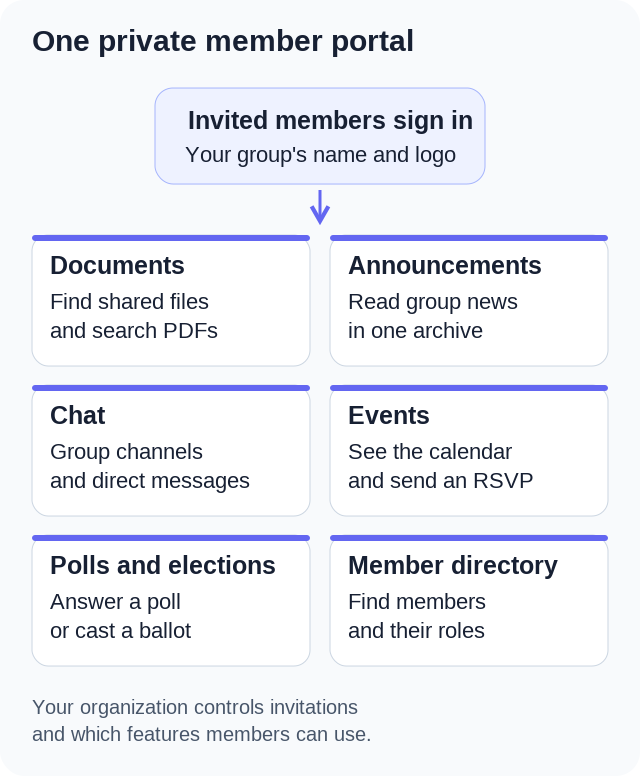
Give your local one app for all of it
One Group Central carries the contract, the announcements, the chat, and your votes, with encrypted ballots and a receipt each voter can check, in one private portal.
Start your free trial One-page brief for your board (PDF)