Check your vote receipt against the election record
What does a vote receipt check prove?#
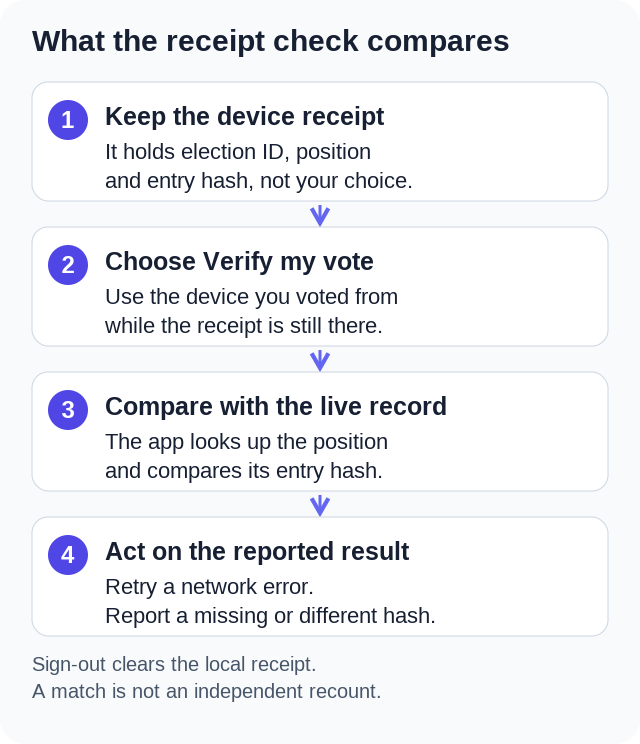
A One Group Central vote receipt lets you check whether the election record still holds the entry hash at the position you were given when you voted. To check, open the election or its receipt on the device you voted from and choose "Verify my vote". A match shows "Vote verified".
The final chain root, shown to admins when results are ready, lets your organization compare the whole record, as the server returns it, with a fingerprint it kept somewhere else. These checks have specific limits; neither is an independent recount.
Verify your receipt in the app#
- On the device you voted from, open the election or its receipt. If you have signed out since voting, or the app signed you out, the receipt is gone and Verify my vote does not appear.
- Choose Verify my vote. The app retrieves chain metadata and compares your stored position and entry hash.
- Vote verified means those values match the server's current record. Entry not found or Hash mismatch: possible tampering means they disagree; contact your administrator. A network error offers a retry.
The receipt contains the Election ID, Chain Position, and Entry Hash. It contains no ballot choice, but it identifies an entry. Share it only when needed, for example when investigating a mismatch. The receipt disappears when you sign out, when the app signs you out, or when the app or its data is removed. Copy receipt keeps the values for your records, but the app cannot check a pasted copy. Your ballot is unaffected either way.
What the chain endpoint returns#
The signed-in chain endpoint returns ordered entries with sequence number, previous hash, entry hash, and recording time. It does not return voter names or encrypted ballot contents. Access is organization-scoped; in the updated release, direct chain access also enforces election module permission and existing audience access.
You can check sequence and linkage and compute a root from the supplied entry hashes. You cannot independently recompute each ballot entry hash without the omitted ciphertext. The in-app receipt check compares your entry; it does not perform a cryptographic recount of the election.
Preserve the final root separately#
After tally, the admin results screen shows a Merkle root: one fingerprint computed from the entry hashes. Have an admin record it in your meeting minutes or another independently controlled record. Recomputing a different root later can reveal a changed record relative to that saved value.
Comparing a chain with a root retrieved from the same server at the same time only establishes consistency between those responses. A server able to replace both can provide a consistent replacement. A matching receipt also does not prove that the encrypted ballot contained your intended choices or that the reported tally was calculated correctly.
Read How anonymous voting works for the current operator trust boundary.
Election reports#
Owners and approved observers can open Election records and Download audit report. The complete JSON report provides configuration, aggregate counts and results, a server-computed integrity summary, preservation status, and selected lifecycle activity. It excludes ballot ciphertext, individual turnout, and voter identities.
The election records report supplements receipt and chain checks. It does not replace external observation, an independent audit, or a recount. The private key is deleted from the live database after successful tally, so the app cannot decrypt the preserved ciphertext again or support a recount. Steps: Election records and observers.
What should I do with a missing or failed receipt check?#
Use the check's result to choose the next step, rather than treating every failure as the same problem.
| What you see | What to do |
|---|---|
| A network error with a retry | Restore the connection and retry the receipt check. No comparison result has been established yet. |
| Entry not found or Hash mismatch: possible tampering | Keep the receipt values and tell your administrator the election and reported mismatch. |
| No Verify my vote action after sign-out | The device no longer holds the receipt. Signing back in does not recreate that local receipt, and your recorded ballot is unaffected. |
A matching vote receipt confirms the receipt's entry and position in the server's current record. A match does not establish that the ballot held your intended choice or that the final tally was calculated correctly.
Troubleshooting#
If verification fails, save the receipt and report the election, position, and mismatch. Do not assume a network error proves tampering. If you no longer have a receipt, there is nothing for you to check in the app, and your ballot is unaffected. An admin can still download the chain from the results screen, one page of 500 entries at a time, and compare all of it with the final root. That checks the record as a whole but cannot pick out your entry. Access can also end if your account, module permission, or election access changes.
Read about hashes and ballot encryption#
NIST FIPS 202 defines SHA-3, and the libsodium sealed-box documentation describes the ballot encryption primitive. Those definitions do not make a hash comparison an independent recount. The server-provided record, locally retained receipt and separately retained final root have the different limits explained on this page.
References checked October 12, 2026. This date records the source-link check, not a human or specialist review of this article.
Published: . Last updated: .