Cancel or Pause Your Subscription
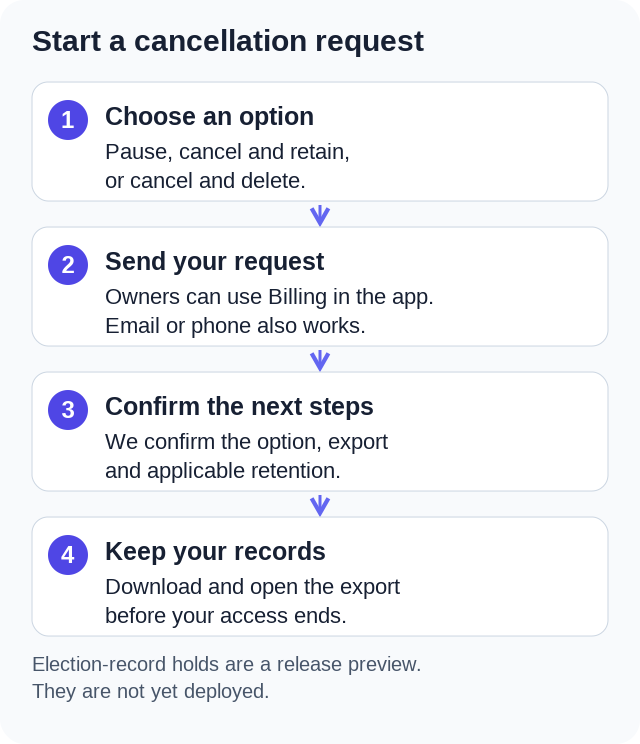
The owner of a One Group Central organization cancels or pauses the subscription from the Billing screen by choosing one of three options: "Pause for a season", "Cancel, keep data 90 days" or "Cancel, delete now". The options differ in what happens to billing and to your data, and the request goes to our team.
Start here when your organization is winding down, going quiet for a season, or moving on. Nothing is cancelled or deleted the moment you ask: your request goes to our team, and you can withdraw it any time before it is acted on.
Election preservation#
Cancellation and deletion requests are subject to election preservation. Records stay protected while voting is open and for at least one calendar year after successful closure, or longer if an owner extends the deadline. Deleting a user or organization cannot bypass that hold. Ordinary deletion timelines below apply only once any applicable hold has ended.
Access can be suspended and billing handled separately from deletion. The team must confirm what can be removed and when; a deletion request does not automatically erase held evidence. See Election records and observers.
Requirements#
Only the organization owner can start a cancellation. Admins with billing access see the Billing screen, but if they try to cancel they see: "Only the organization owner can start a cancellation."
The three options#
- "Pause for a season" stops billing, keeps all data, and lets you reactivate any time. It suits seasonal organizations (a summer league, a school-year association) that will be back.
- "Cancel, keep data 90 days" (the default) means you receive a full export of your data within 7 days, your data is kept for 90 days in case you want to restore, and deletion follows the agreed timeline, subject to any election preservation hold.
- "Cancel, delete now" means you receive your export within 7 days, and deletion is then targeted within 7 days of the export being delivered, subject to any election preservation hold. Choose this when you need the data gone, not just billing stopped.
Every option includes a full export of your data: your records as spreadsheets and your files in their original formats. Two kinds of file are left out on purpose. Sensitive documents in the encrypted vault are listed by title but not included, because the export does not decrypt them, and attachments in direct messages stay private to the members who exchanged them. The cancellation policy page lists everything the export contains.
Nothing happens instantly#
Submitting a request does not cancel billing or touch your data by itself. The request goes to our team, and you see: "Request received. We will be in touch within 24 hours." Your portal keeps working normally in the meantime. The delay is deliberate: a mis-tap or a change of heart should not cost you your organization's data.
Withdrawing a request#
You can withdraw a pending cancellation request at any time before it is acted on, from the same Billing screen. Billing and data then continue exactly as before.
Tip: If cost is the issue rather than the portal, consider a smaller plan first (see /help/billing/plans-and-limits and /help/billing/upgrade-your-plan), or ask about the nonprofit discount at info@onegroupcentral.com.
The cancellation policy page#
The full written policy, including exactly what each option does with your data and on what timeline, is published at /cancellation. Share it with your board or counsel if they want the details in writing before you decide.
The export's records come as CSV files, packed with your other files into a single ZIP archive. RFC 4180 describes the CSV format that spreadsheet programs exchange, and PKWARE's .ZIP File Format Specification documents the ZIP format. These references describe the file formats, not what your organization must keep or for how long.
FAQ#
How do I cancel my subscription?#
As the owner, open the Billing screen, start a cancellation, and choose one of the three options: Pause for a season, Cancel and keep data 90 days, or Cancel and delete now. The request goes to our team, who will be in touch within 24 hours.
What happens to our data if we cancel?#
You get a full export within 7 days under every option. The normal timelines are 90 days for a possible restore, or within 7 days after export for "delete now". Any active election preservation hold takes precedence over those deletion dates. Pausing keeps everything.
Can we get a refund?#
Once, under the first month guarantee. If your first election in One Group Central did not run the way the site describes, email info@onegroupcentral.com within 30 days after that election closes and we refund your first month. On yearly billing that is one twelfth of the yearly payment. Other paid fees are non-refundable. The exact terms are in the Terms of Service at /terms.
Can I undo a cancellation request?#
Yes, a pending cancellation request can be withdrawn any time before our team acts on the request. Withdraw the request from the Billing screen and everything continues as before.
Why can't I cancel as an admin?#
Cancellation is owner-only. Admins with billing access see "Only the organization owner can start a cancellation." Ask your owner to submit the request.
Published: . Last updated: .