Using the audit log
The audit log is your organization's activity record: who did what, when, and from where. Invites, document uploads, broadcasts, election actions, settings changes, and more land here automatically. Use it to answer "who changed this?" questions, investigate problems, and keep records for your board or auditors.
Requirements#
You need the "View Audit Logs" permission. Owners always have it; for other admins it is granted on the permissions screen. If the Audit Log drawer item is missing, ask your owner.
What gets logged#
Actions across the whole portal are recorded with the actor, the action, the affected item, a timestamp, the IP address, and structured metadata. That includes member and role changes, org settings edits, invites, document activity, broadcasts, election lifecycle actions, poll activity, and resource changes.
Election vote activity is scrubbed of voter attribution and chain-position associations in the audit view. Lifecycle entries can identify the administrator who created, opened, or tallied an election; the interface does not reveal individual choices. The scrubbed audit view is not proof of anonymity against service operators or correlation through other systems. See the security overview for the full privacy model.
Browse and search#
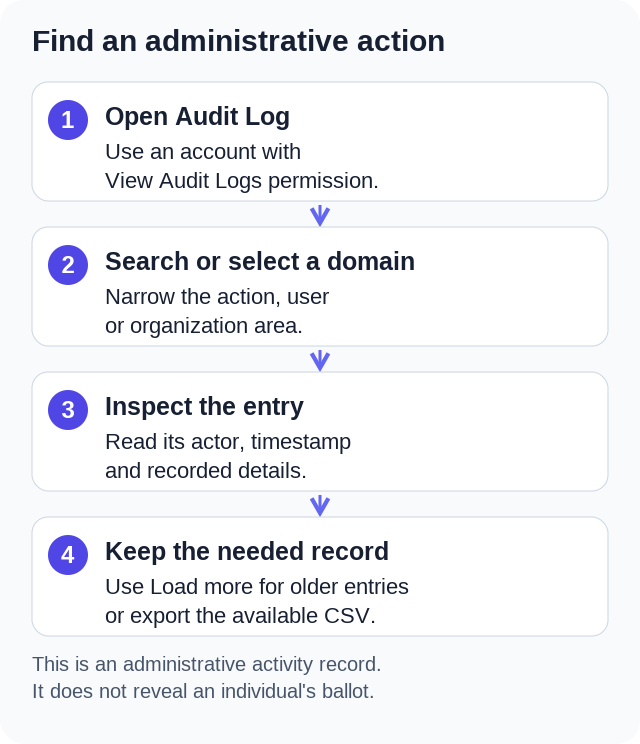
- Open the admin area and choose "Audit Log" from the drawer.
- Type in the search box ("Search actions, users, entities…") to filter entries.
- Tap a domain chip to narrow to one area: Auth, Users, Org, Invites, Documents, Broadcasts, Elections, Polls, or Resources.
- Entries load 50 at a time. Press "Load more" at the bottom to page further back in time.
Inspect an entry#
Tap any entry to open its detail dialog. The detail dialog shows who performed the action, what exactly happened, when, and where (the IP address), plus the entry's metadata: the structured details recorded with the action, such as the old and new values of a changed setting.
Export to CSV#
Press the "Export CSV" button in the app bar to download the full log as a CSV file, up to 10,000 rows. The export is not limited to your current search or chip filter; it is the whole log. Use the web app for exports, since downloading a file works most reliably there. Open the CSV in any spreadsheet tool for filtering, sorting, or archiving.
Tip: If your organization needs long-term records, export the CSV on a regular schedule (for example, quarterly) and file it with your other governance documents.
Election observer reports#
An owner can grant an existing eligible active member access to one election's Election records screen. Observer access does not grant View Audit Logs. The report excludes voter identity fields, IPs, individual turnout, vote events, per-ballot times, ciphertext, and keys.
The Election records screen's Download audit report action collects every report page into JSON and checks for changed activity totals or page counts during collection. The JSON report is separate from the general audit CSV, which is capped at 10,000 rows. See Election records and observers.
Troubleshooting#
If the Audit Log item is missing from the drawer, you lack the "View Audit Logs" permission. Ask an owner to grant it.
If an action you expected is not there, check the domain chips and clear the search box, because the entry may be filtered out. Older entries need "Load more" to appear.
If the export seems cut off, that is the cap: exports stop at 10,000 rows, newest first. Export regularly if your organization is active enough to pass that between exports.
RFC 4180 describes the CSV format, including how fields that contain commas or line breaks are quoted. NIST SP 800-92, Guide to Computer Security Log Management gives practical guidance on developing, implementing and maintaining log management practices. Those references explain a file format and general log practice; they do not set how long your organization must keep its records.
FAQ#
How do I see who deleted a document?#
Open the Audit Log, tap the Documents chip, and look for the delete entry, or search for the document title. Tap the entry to see the actor, timestamp, and IP address.
Why don't votes show up in the audit log?#
The ordinary audit interface does not attribute individual election choices. Lifecycle actions are logged; the current service still receives identity and choices during submission. See How anonymous voting works.
Can I export the audit log?#
Yes. The CSV export downloads the full log, up to 10,000 rows. Use the web app for the download, then open the file in any spreadsheet tool.
How far back does the log go?#
The normal audit log interface does not offer log editing. Organization or related-account deletion can affect records; an active election hold prevents deletion of protected election evidence. The on-screen list pages 50 entries at a time with "Load more", and the CSV export returns up to 10,000 of the most recent rows.
Published: . Last updated: .