Not receiving invite or password reset emails
When a One Group Central invitation or password reset email does not arrive, the usual cause is a mail filter or an out-of-date link. Check your spam or junk folder and search all mail for "onegroupcentral". For an invite, ask your administrator to restore and resend it; for a reset, request a fresh one.
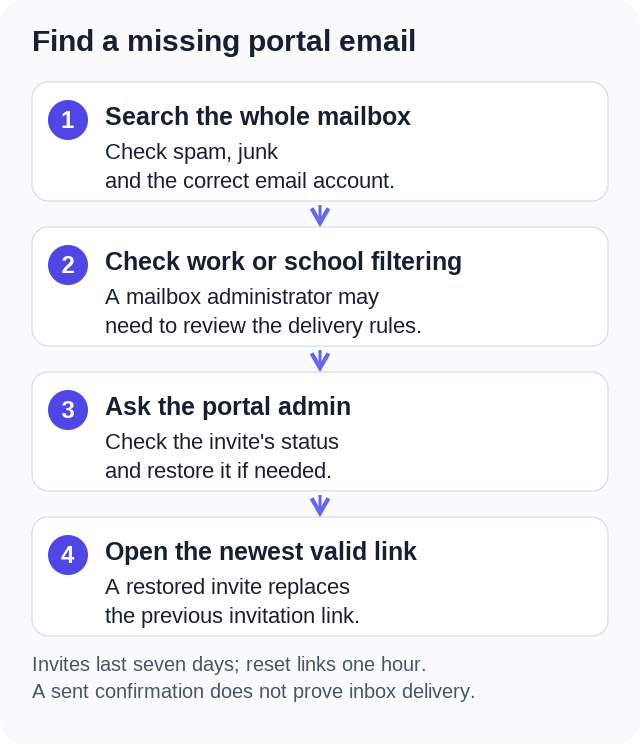
Work through these checks in order.
1. Check spam and junk#
Open your spam or junk folder and look for the message. Invitation emails usually have the subject "You've been invited to join
2. Search your whole mailbox#
Search all mail for "onegroupcentral". Some mail apps file automated messages into tabs or folders (Promotions, Updates, Other) that are easy to miss, and a search catches the email wherever it landed.
In Gmail, search Mail & Spam & Trash, not just the inbox; Google's missing-message instructions also explain filters and Not spam. In Outlook with a Microsoft-hosted mailbox, check Junk Email and blocked senders using Microsoft's instructions. If Outlook displays a Gmail or another provider's mailbox, check that provider's settings too. References checked October 11, 2026.
3. Corporate and school filters#
Work and school mail systems often quarantine automated mail before it ever reaches your mailbox. If you are using a company or institutional address, ask your IT team to check the quarantine and to allow mail from onegroupcentral.com. You can also ask your administrator to re-invite you at a personal address.
4. Waiting on an invite? Ask your admin to restore or resend it#
Your administrator can fix a missing invite from the Invites screen:
- If your invite is still pending, your administrator can revoke it and use "Restore" to generate a fresh link, keeping the "Resend the invite" checkbox on.
- Restoring shows: "This will generate a new invite link for
, valid for 7 days. The previous link will no longer work." - Your administrator can also copy the new link when it is shown and send it to you directly by any channel you prefer.
Note: Each invite link is single use and each restore invalidates the previous link, so always use the newest one you were sent. If your link already expired, see Invite Link Expired.
5. Waiting on a password reset?#
Reset links expire in 1 hour. If you found the email late, request a fresh reset from the login screen rather than clicking the old link. The confirmation screen always says the link was sent, even when a filter is catching it, so if repeated requests never arrive, go back to steps 1 to 3.
Once the invite is in hand, Accept an Invitation walks through joining. If you are still stuck, write to info@onegroupcentral.com or use the /support page.
What the two emails look like#
Both emails show your organization's name as the sender name. The address they come from is a shared One Group Central address, unless your organization has verified its own sending domain, in which case it comes from that domain. If a search for "onegroupcentral" finds nothing, search for your organization's name as well.
The invitation's subject is "You've been invited to join" and your organization's name, unless your administrator changed it. Its button reads "Open the member portal", and the email says the link works once and is valid for 7 days. The password reset email's subject is "Reset your" followed by your organization's name and "password". Its button reads "Reset Password", and it says the link expires in 1 hour.
Password reset limits#
The "Forgot your password?" screen sends a reset only in specific cases, and it shows the same "Check your email" message whether or not one was sent, so that nobody can use it to learn who has an account. A reset email goes out only when:
- The address matches the email on your account exactly. Use the address you sign in with.
- The account is active. An invitation you never accepted, or a suspended account, gets no reset email.
- You are on your own organization's portal address, because a reset is tied to the organization in the address.
The screen allows three requests in ten minutes from the same network. A fourth shows "Too many requests"; wait ten minutes and try once more. Each new request cancels the link from the request before it, so only the newest reset email works.
Reasons on the organization's side#
An administrator can check two settings when nobody in the organization gets invitations. The "Email notifications" switch on the Features tab must be on: with it off, invitation emails are not sent at all, and the admin shares each link with "Copy link" instead. Password reset emails are sent whether or not that switch is on.
Each plan also has a monthly email limit. Once the organization reaches it, further invitation and password reset emails are dropped, and the audit log records email.quota_exceeded. An admin with the Manage Billing permission sees the count as "Emails sent" in the "Usage this month" card on the Billing screen; the count resets on the first of each month. See /help/billing/usage-limits.
What should I tell the administrator if these checks fail?#
Give the administrator your expected login email, organization name, portal address and whether you are waiting for an invitation or a password reset. Include roughly when you requested the invitation or reset and any error shown. The timing and error distinguish a message that never arrived from a link that arrived but no longer works.
An admin can check or restore an invitation. A password reset applies to an existing account, so requesting a reset will not accept an unused invitation. Avoid repeatedly switching between the two flows. If the email is correct but a school or employer's mail filter is holding the message, your mail administrator may need to release it; restoring the invite alone does not change that filter.
FAQ#
Why did my invitation email go to spam?#
Automated mail from a sender your mailbox has never seen is often filtered. Marking the message as not spam teaches your mail provider to trust future portal emails.
Can my admin just send me the link directly?#
Yes. When an invite is created or restored, the admin sees the one-time link with a "Copy link" button and can paste it to you over any channel.
How long are invite and reset links valid?#
Invite links last 7 days and work once. Password reset links last 1 hour. Either can be regenerated at any time.
What if the admin resends and it still never arrives?#
The address may be blocked upstream (corporate filter or a typo in the address). Verify the exact spelling with your admin, involve IT for a quarantine check, or switch to a different email address.
Published: . Last updated: .