Free trial: 60 days, no credit card
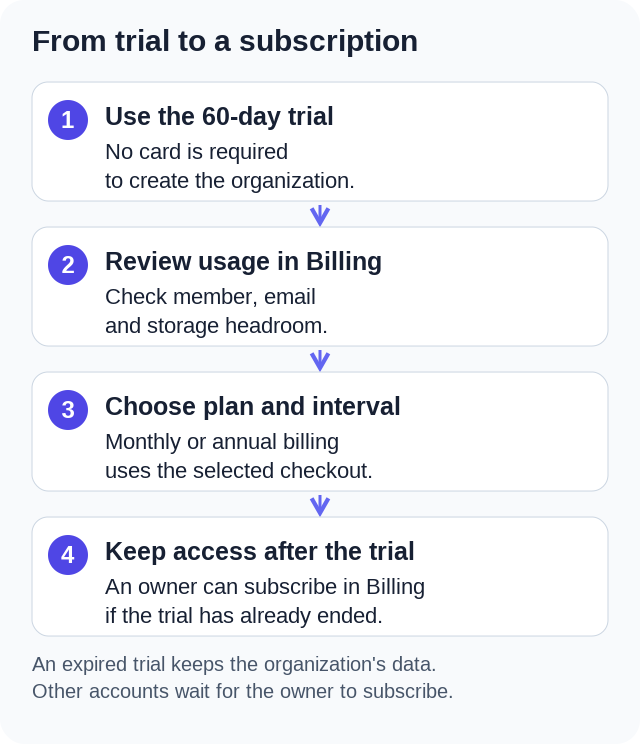
The One Group Central free trial lasts 60 days and requires no credit card. Sign up, invite members and evaluate the available portal features before deciding whether to subscribe. The trial has smaller member, monthly email and storage caps than paid plans. Each email address is eligible for one free trial.
What the trial includes#
The trial runs 60 days from signup with these caps:
| Cap | Trial limit |
|---|---|
| Members | 25 |
| Emails per month | 500 |
| Storage | 200 MB |
You and your admins count toward the 25. Need more people to evaluate properly, for example a vote of your whole membership? Email info@onegroupcentral.com and we will raise the member limit for your trial. Nothing else about the trial changes.
The trial uses the available portal features with smaller caps. A trial does not activate undeployed release previews such as surveys or member payments. Optional add-ons retain their own setup and limits. To create your trial organization, see /help/getting-started/create-your-organization.
Text messages are off during the trial. Texting is a paid add-on that One Group Central turns on for your organization; email info@onegroupcentral.com to ask. Once on, a trial organization can send up to 100 texts a month.
Watching the trial on the Billing screen#
Owners, and admins with the "Manage Billing" permission, can open Admin Panel > Billing at any time during the trial. The "Current Plan" card shows the plan as Trial, a Status of "trialing", the "Member limit", and a "Trial ends" row with the date the trial expires. The "Usage this month" card shows members (with open invitations counted as "+ N invited"), emails sent, and storage against the trial caps. A meter turns amber at 80% and red when the cap is reached. Emails reset on the first of each month; members and storage are current totals.
What happens when the trial ends#
When day 60 passes without a subscription:
- Members and admins can't sign in. They see: "Your organization's free trial has ended. Ask your organization's owner to subscribe." Anyone already signed in is signed out within about 30 seconds.
- The owner can still sign in, but only to the Billing screen. It opens with a "Your free trial has ended" notice, and the rest of the portal stays closed until you subscribe.
- Your data is not deleted. Subscribing restores access to everything exactly as you left it.
Warning: Expiry locks out every member and admin at once. If your organization is using the portal, subscribe before day 60 to avoid an interruption.
Keeping access: subscribe#
To keep the portal running, subscribe from the Billing screen before or after the trial ends. After it ends, sign in as the owner and you land on that screen. Pick a plan and complete checkout. Access is restored for everyone as soon as payment goes through. The steps are in /help/billing/upgrade-your-plan, and the plan options are compared in /help/billing/plans-and-limits.
Paying from the expired trial does not require a fresh sign-in. The owner's session gets full access on the next request after the payment goes through. Members and admins sign in again as usual.
If you leave Stripe Checkout without paying, the app shows "Checkout cancelled" with "No changes were made" and "Your current plan is unchanged and nothing was charged." Press "Back to Billing" to try again.
One trial per email address#
Each email address gets one free trial. If you sign up a second organization with the same email, the organization is created without a trial. Sign in and you land on its Billing screen, where you subscribe to activate it.
Troubleshooting#
If sign-in shows "Your organization's free trial has ended. Ask your organization's owner to subscribe.", the 60 days are up. Only members and admins see this. The owner signs in, lands on the Billing screen and subscribes, and access returns right after checkout.
If a new organization opens straight to Billing, your email already used its free trial. Subscribe there to activate the organization.
How can a committee test within the trial caps?#
Start with the owner, two admins and 20 members: those 23 active accounts leave two seats for open invitations. Once both invitations are issued, all 25 trial seats are reserved, even before the invitees accept. Count the owner and admins when planning the test.
Four email announcements to the 23 active accounts use 92 of the month's 500 emails. Choose a few useful documents rather than uploading the full archive into the 200 MB trial storage allowance. Check the Usage card during the test. If a full-membership evaluation needs more seats, contact support before sending the remaining invitations; do not assume that a smaller test group raises the cap.
When you subscribe, checkout runs on Stripe Checkout, where you enter your payment details on Stripe's payment page rather than in the portal. The PCI Data Security Standard is the card industry's baseline of technical and operational requirements for protecting payment account data. These references describe Stripe's product and the card industry standard; they are not a certification of the portal.
FAQ#
Do I need a credit card to start the trial?#
No. The trial is 60 days with no payment details required. You only enter payment information if you decide to subscribe.
What happens if my trial expires? Is my data deleted?#
No. Sign-in is blocked and sessions stop working, but your data stays intact. Subscribing restores everything as it was.
Can I get a second free trial?#
Not with the same email address. A second organization is created without a trial.
How do I keep access after the trial?#
Subscribe from the Billing screen. Choose a plan, complete Stripe Checkout, and access is restored immediately. If the trial has already ended, sign in as the owner and the app opens on Billing for you.
Published: . Last updated: .