Usage limits: members, emails, and storage caps
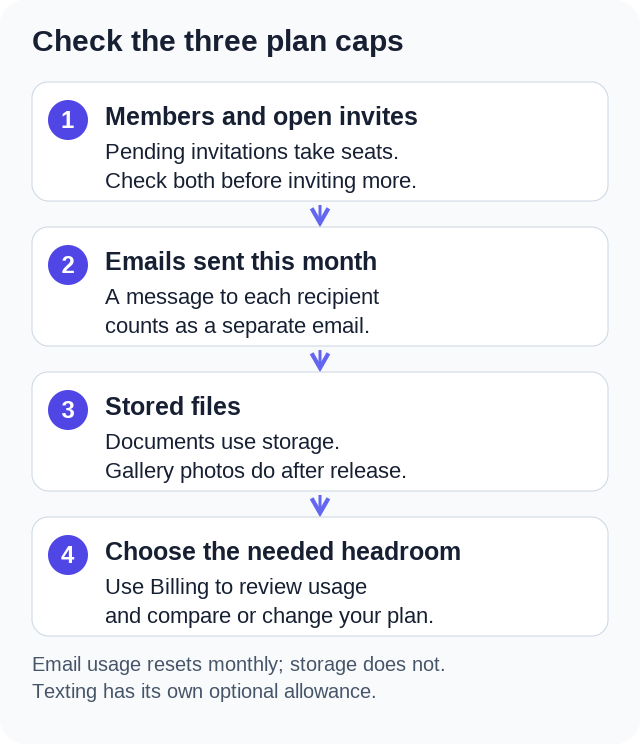
One Group Central plans cap members, monthly emails and storage. The Usage card on the Billing screen shows those three totals. Organizations using the optional texting add-on also have a monthly text allowance that the card does not show. A cap refusal means the requested action was not completed; review the applicable error before retrying.
Requirements#
Owners and admins with the Manage Billing permission can see the Billing screen and its Usage card. Open "Admin Panel" from the home grid, then choose "Billing" in the drawer.
Reading the Usage card#
The Usage card is titled "Usage this month". It has one meter each for active members, emails sent this month, and document storage used, each measured against your plan's cap.
A meter turns amber at 80% of its cap. As the card notes: "Emails reset on the first of each month. Members and storage are current totals."
Gallery photos share the storage allowance#
Event gallery photos count against the same storage cap as documents. The Billing storage meter includes both. A photo cannot be added if it would exceed the remaining allowance. Removing a photo or deleting an album releases its counted storage. Storage does not reset at the start of a month.
Before a large upload, check the meter and remove files you no longer need or upgrade the plan. See managing event galleries for supported photo types and the per-photo limit.
The exact errors at each cap#
| Cap reached | Where it hits | What you see |
|---|---|---|
| Member limit | Sending or restoring an invite, or reactivating a member | A message starting "Member limit reached." that gives your limit and how many members and open invitations take seats |
| Member limit | An invitee accepting | "This organization has reached its member limit, so your account was not created." Their invitation stays valid |
| Monthly email cap | Sending a broadcast | "This org's monthly email cap has been reached." |
| Storage cap | Uploading a document | An error saying the plan is out of storage |
| Monthly text allowance | Sending a broadcast by Text or Both | The error "sms_quota_exceeded" |
The server enforces these caps. A blocked action does not happen, and nothing is queued to send later.
When counts reset#
Email counts reset to zero on the first of each month, so a broadcast blocked on the 30th may go through on the 1st.
Text counts start again at the beginning of each month, UTC. See sending by text for each plan's allowance, and for how a scheduled broadcast behaves when the allowance runs out.
Members and storage are running totals and never reset. They go down only when members are removed or documents are deleted.
The Members meter counts open invitations as well as members, because each one is a seat somebody can take with one click. It reads like "20 + 5 invited / 25". An invitation stops counting once it is accepted, revoked, or expires.
What to do at each cap#
At the member limit, upgrade to a plan with a higher member cap (see /help/billing/upgrade-your-plan), then re-send the blocked invites (see /help/admin/inviting-members). Revoking open invitations that will not be used frees seats straight away, and so does suspending departed members. On the free trial, email info@onegroupcentral.com and we will raise the trial's member limit.
At the email cap, wait for the monthly reset on the 1st or upgrade for a higher monthly cap. Group targeting on broadcasts means each send counts fewer recipients.
At the storage cap, delete documents you no longer need or upgrade for more storage. Compare caps in /help/billing/plans-and-limits.
Tip: Act when a meter turns amber at 80%. Upgrading takes effect immediately, so upgrade before a big send rather than after it is blocked.
The storage meter counts a megabyte as 1,048,576 bytes (1,024 times 1,024), so your computer may report a slightly different size for the same files. NIST's page on prefixes for binary multiples explains the difference between a megabyte of 1,000,000 bytes and a mebibyte of 1,048,576 bytes.
Text counts reset at the start of each month in UTC. RFC 3339's explanation of UTC and local offsets helps distinguish that shared time reference from the time shown on your device. These references explain the units and time reference, not your plan's caps. References checked October 13, 2026.
FAQ#
Why can't I invite more members?#
Your organization is at its One Group Central plan's member cap, counting open invitations, and the invite fails with a message that starts "Member limit reached." Revoke invitations that will not be used, suspend members who have left, or upgrade your plan. During the trial, email info@onegroupcentral.com to have the limit raised.
When does the email count reset?#
On the first of each month. Members and storage do not reset, because they are current totals.
What happens if a broadcast is blocked by the email cap?#
A broadcast refused by the monthly email cap is not sent and not queued. After you upgrade, or after the monthly reset, send it again.
Do the caps warn me before I hit them?#
Yes. The Usage card meters turn amber at 80% of each cap, before anything is blocked.
Published: . Last updated: .