Common error messages explained
The One Group Central error reference explains the error messages a member or administrator may see, what each one means, and what to do next. They cover plan limits on members, email and storage, the one-vote and one-response rules in elections and polls, features or permissions turned off, and chat messages or RSVPs that did not reach the server.
Sign-in errors have their own walkthrough in Can't Sign In.
Quick reference#
| Message | Where | Meaning |
|---|---|---|
| "You have already voted in this election." | Submitting a ballot | One vote per person is enforced cryptographically |
| "This poll has expired and is no longer accepting responses." | Submitting a poll answer | The poll's expiry date passed |
| "You have already responded to this poll." | Submitting a poll answer | One response per person per poll |
| "Member limit reached." followed by your limit and current counts | Sending or restoring an invite, or reactivating a member | Members plus open invitations fill the plan's member cap |
| "This organization has reached its member limit, so your account was not created." | Accepting an invitation | The organization filled up after the invitation was sent |
| "This org's monthly email cap has been reached" | Sending a broadcast | The plan's monthly email quota is used up |
| "Your plan is out of document storage. Delete some files or upgrade the plan to add more." | Uploading a document | The plan's storage cap is full |
| "You don't have access to..." | Various screens | A permission or feature is off for you |
| "Not sent. Tap to retry" | Chat | Your message could not reach the server |
| "Could not save your RSVP." | Calendar events | The RSVP did not reach the server |
Voting and polls#
"You have already voted in this election." means you already voted. Elections allow exactly one ballot per member, enforced by the cryptographic one-vote guarantee. There is nothing to fix; your earlier vote counts. If you have a receipt, you can confirm it with "Verify my vote".
The poll error "This poll has expired and is no longer accepting responses." means the administrator set an expiry date that has passed. Poll answers can no longer be recorded.
"You have already responded to this poll." means you already answered. Each member gets one response per poll, even when the poll allows multiple selections in a single submission. Your first submission stands.
Plan limits#
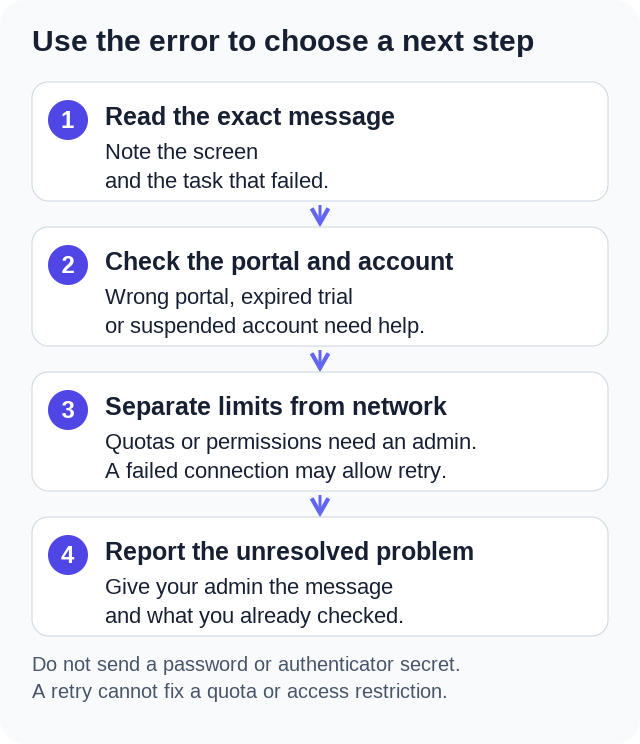
The member, email and storage quota errors mean the organization hit a cap on its plan, not that you did anything wrong. Members should mention them to an administrator; administrators can review usage on the Billing screen, where meters turn amber at 80%. Details in Usage Limits.
At the member limit, no more invitations can be sent until a seat frees up or the plan is upgraded. Open invitations take seats, so revoking ones that will not be used frees room. Someone accepting an older invitation while the organization is full is told so and keeps a working link; once a seat frees, the same link lets them in. On the free trial, email info@onegroupcentral.com to have the member limit raised.
At the monthly email cap, broadcasts that send email are blocked for the rest of the month. Email counts reset on the first of each month.
At the storage cap, document uploads are blocked until files are removed or the plan is upgraded.
Permissions#
Messages in the form "You don't have access to..." (and missing tiles or sections) mean either the feature is turned off for the organization or your individual permission for it is off. Neither is something you can fix yourself. Ask your administrator, who controls both feature switches and per-member permissions.
Chat and calendar#
"Not sent. Tap to retry" appears in red under a chat message that could not be delivered, usually because the connection dropped. The app retries automatically when the connection returns (or every 15 seconds); you can also tap the message to retry immediately, or choose Discard.
"Could not save your RSVP." means your Going/Maybe/No choice did not reach the server. Check your connection and tap the RSVP chip again.
Tip: For any repeated or unexplained error, note the exact message text and contact your administrator, or reach the team at info@onegroupcentral.com or the /support page.
When "Not sent. Tap to retry" or "Could not save your RSVP." keeps appearing, Apple's Wi-Fi guide covers checking Wi-Fi settings on an iPhone or iPad, and Google's Android connection guide suggests restarting the device and switching between Wi-Fi and mobile data. Those guides cover the device connection only; the plan limit and permission messages above need an administrator.
FAQ#
Why can't I vote or respond a second time?#
Elections and polls both enforce one submission per member. For elections this is a cryptographic guarantee; for polls it is checked per response.
What happens when the monthly email cap resets?#
Email caps reset on the first of each month, and blocked broadcasts can be sent again from then.
Why can't I see a section other members can see?#
Your administrator may have turned off that permission for your account, or the content is targeted at groups you are not in. Ask your administrator.
Can I fix a quota error myself?#
Members cannot; quotas belong to the organization's plan. Administrators can free capacity or upgrade from the Billing screen.
Published: . Last updated: .