Troubleshooting
How do I fix a portal access problem?
Work through sign-in errors, missing invitation emails and expired links. Find what you can retry yourself and when an organization admin needs to help.
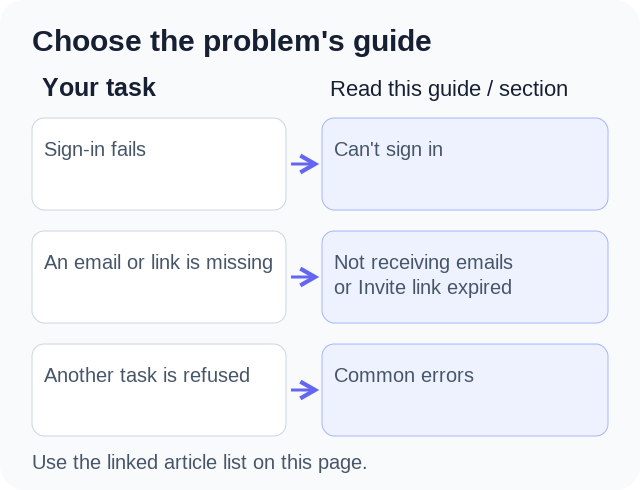
- Can't sign in? Fix every login problem step by stepWork through every One Group Central sign in failure, from wrong portal address and forgotten passwords to suspended accounts and 2FA code errors.
One Group Central sign-in problems almost always come from the wrong portal address, wrong credentials, an account or organization status message, or a two-factor code issue. First check that you are at app.onegroupcentral.com/ followed by your organization's slug, then tap "Forgot password?" on the login screen if the password is the problem.
- Not receiving invite or password reset emailsWhat to do when a One Group Central invitation or password reset email never arrives, including spam checks, corporate filters, and resending invites.
When a One Group Central invitation or password reset email does not arrive, the usual cause is a mail filter or an out-of-date link. Check your spam or junk folder and search all mail for "onegroupcentral". For an invite, ask your administrator to restore and resend it; for a reset, request a fresh one.
- Invite link expired or already used, what to doWhy a One Group Central invitation link stops working after 7 days or one use, what the error screens mean, and how an admin restores an invite.
One Group Central invitation links are valid for 7 days and can be used exactly once. If your link expired, nothing is wrong with your account: ask your administrator to tap "Restore" on your invite in the "Revoked / Expired" section of "Invites", which generates a fresh 7-day link. Only the newest link works.
- Common error messages explainedA reference for the error messages anyone may see in One Group Central, what each one means, and the fastest fix, from voting errors to quota limits.
The One Group Central error reference explains the error messages a member or administrator may see, what each one means, and what to do next. They cover plan limits on members, email and storage, the one-vote and one-response rules in elections and polls, features or permissions turned off, and chat messages or RSVPs that did not reach the server.
- Members can't see a documentWhy members cannot see a document that admins can, and what to check: the document's group, Sensitive, View Documents, removal, and the feature switch.
When members cannot find a document you uploaded, the usual cause is its group: the document was aimed at a group, and those members are not in that group. Check that first. Then check whether the document was uploaded as Sensitive, whether the member's View Documents permission is off, whether the document was removed, and whether the Documents feature is on.
Published: . Last updated: .