Invite link expired or already used, what to do
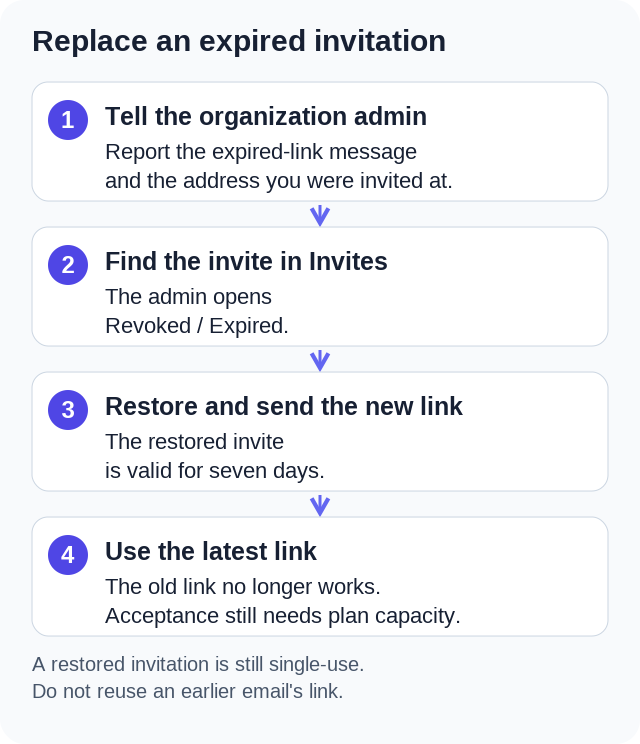
One Group Central invitation links are valid for 7 days and can be used exactly once. If your link expired, nothing is wrong with your account: ask your administrator to tap "Restore" on your invite in the "Revoked / Expired" section of "Invites", which generates a fresh 7-day link. Only the newest link works.
Invitation links are deliberately short-lived, and your administrator can generate a fresh one in seconds. This article explains each error screen and the fix.
Why links expire#
A live invite link lets anyone holding it create an account in your organization's private portal. Limiting each link to 7 days and a single use keeps a forwarded email or an old message thread from becoming a permanent back door. The 7-day, single-use limit is a security feature, not a malfunction.
The screens you might see#
"Invitation already used" means the link was accepted once already, and the screen offers "Sign in instead". If you accepted it yourself and forgot, sign in with your email and password. If you did not, tell your administrator.
"Invitation expired" comes with the explanation that invitations are valid for 7 days, and asks you to get a new one from your administrator.
"Invitation revoked" means an administrator canceled this invite. Contact them if you believe it was a mistake.
What the administrator does#
Restoring an expired or revoked invite takes one action on the Invites screen:
- Open the admin area and go to "Invites".
- Find the invitee under the "Revoked / Expired" section.
- Tap "Restore". The confirmation reads: "This will generate a new invite link for
, valid for 7 days. The previous link will no longer work." - Leave the "Resend the invite" checkbox on (it is on by default) so the invitee gets the new link automatically, or copy the new link and share it directly.
Note: Every restore invalidates the previous link. If you were sent more than one, only the newest works. Full admin details are in Inviting members.
A hidden cause: the member limit#
Each plan has a member cap, and an invite cannot be accepted (or re-issued) when the organization is full. If that happens when you accept, you see "This organization has reached its member limit, so your account was not created. Your invitation still works until it expires." Nothing is wrong with your link: ask the person who invited you to make room, then open the same link again. On the admin side the message starts "Member limit reached." If your administrator cannot restore your invite, the organization may need to free a seat or raise its limit before you can join.
If the restored email never arrives, work through Not receiving emails. For anything else, contact info@onegroupcentral.com or the /support page.
Which link should I open after an invitation is restored?#
Open the newest link from the restored invitation. Restoring creates a new seven-day token and invalidates the previous one, so an old email can still look convincing while its link no longer works. Search by the message date if several invitations are in the same email thread.
If the newest link says the organization has reached its member limit, another restore is not the fix. Ask the admin to make room or raise the cap, then open that still-valid link again. If it says "Invitation already used" because you accepted on another device, use "Sign in instead" rather than requesting a fresh account.
If several invitations sit in one mailbox, Gmail's search operators include after: and before: for mail received during a time period, and Microsoft's Outlook search guide shows received: for items that arrived on a given date. Those guides only help you find the newest message; the link from the most recent restore is the one that works.
FAQ#
How long is an invitation link valid?#
An invitation link is valid for 7 days from the moment the link is created or restored, and the link works exactly once.
Can my admin resend the same link?#
No. The original link is only available at the moment it is created. Restoring generates a brand-new link and permanently disables the old one.
Why does it say the invitation was already used?#
Someone completed signup with that link, most likely you on another device or browser. Try signing in with your email and password; if that fails and you never accepted it, alert your administrator.
What happens if the organization is at its member limit?#
New invites, restores, and acceptances are all refused until a seat frees up or the limit is raised. Open invitations count toward the limit, so an administrator can free a seat by revoking one that will not be used. If you were refused while accepting, your invitation still works until it expires.
Published: . Last updated: .