Plans and Billing
How do plans, limits and billing work?
Compare plan prices and member, email and storage caps. Learn how the trial, checkout, upgrades and cancellation affect your organization's access.
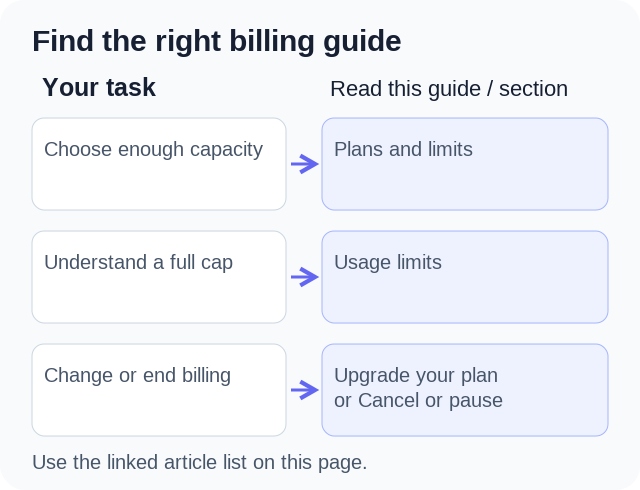
- Plans and limits: pricing and what each plan includesCompare Trial, Starter, Growth, Plus, and Enterprise plans by member, email, and storage caps. Every plan includes every feature of the portal.
One Group Central has a free 60-day trial and four paid plans: Starter at $49/mo, Growth at $99/mo, Plus at $149/mo and Enterprise at $199/mo. Every plan includes every feature. The plans differ in three caps: how many members you can have, how many emails you can send per month, and how much storage you get.
- Free trial: 60 days, no credit cardHow the 60 day free trial works, its member, email, and storage caps, what happens the day it ends, and the one trial per email address rule.
The One Group Central free trial lasts 60 days and requires no credit card. Sign up, invite members and evaluate the available portal features before deciding whether to subscribe. The trial has smaller member, monthly email and storage caps than paid plans. Each email address is eligible for one free trial.
- Upgrade Your Plan From the Billing ScreenStep by step guide to the Billing screen, choosing a plan, paying securely through Stripe Checkout, and confirming your new caps took effect.
Owners and admins with "Manage Billing" upgrade a One Group Central plan from the Billing screen: open "Admin Panel", choose "Billing", choose "Monthly" or "Annual, save 20%", tap the plan you want, and pay through Stripe Checkout. The new plan takes effect as soon as the payment completes.
- Usage limits: members, emails, and storage capsRead the Usage card meters, learn the exact errors at each cap, know when monthly email counts reset, and what to do when you hit each limit.
One Group Central plans cap members, monthly emails and storage. The Usage card on the Billing screen shows those three totals. Organizations using the optional texting add-on also have a monthly text allowance that the card does not show. A cap refusal means the requested action was not completed; review the applicable error before retrying.
- Cancel or Pause Your SubscriptionThe three owner only cancellation options, what each one does with your data, why nothing happens instantly, and how to withdraw the request.
The owner of a One Group Central organization cancels or pauses the subscription from the Billing screen by choosing one of three options: "Pause for a season", "Cancel, keep data 90 days" or "Cancel, delete now". The options differ in what happens to billing and to your data, and the request goes to our team.
Published: . Last updated: .