A private alternative to Facebook groups for organizations
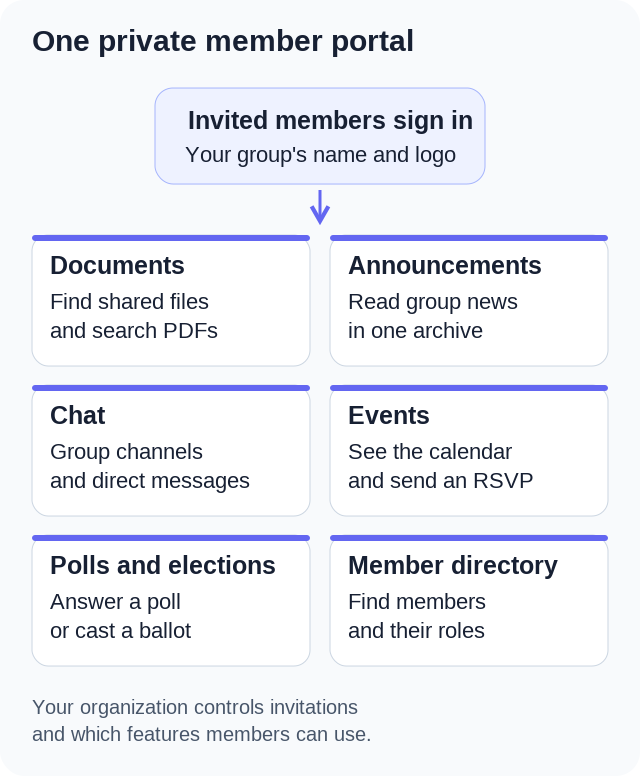
A private member portal gives your group one place for news, documents, chat, events and votes. Only people you invite can get in, and officers control who that is. Members find every update without a Facebook account or a feed that sorts posts for them. To move your group, invite your current members, post the documents they need and pick a clear date to switch.
James Folk says the problem behind One Group Central was a different tool for each job: email, texts, paper ballots and GroupMe.
Start with the files members need now, such as the bylaws and minutes. Members should be able to find those files in the portal before you ask them to learn anything else. A count of who accepted an invite does not tell you that.
Start with current bylaws and minutes
Pick the current bylaws and minutes. Give them titles people will know, and check which members should see them. Ask one person to keep them up to date. Then add notices, chats and events around them. You do not need to copy every old post.
| What members look for | Where to put it | What to check before sharing |
|---|---|---|
| Bylaws, minutes and forms | Documents | Use the current file and a title people know. Share it with the right groups. Do not post a private committee paper to everyone. |
| Official notices and deadlines | Announcements | Choose who gets it and how it is sent. Keep any notice method your rules require. |
| Committee discussion | Chat channels | Set who can see the channel before you ask members to use it. |
| Meetings and events | Calendar | Check the time, the place and who can see it. Show members how to add it to their own calendar. |
| Links people keep asking for | Resources | Check that the link still works and suits the people who will see it. |
Keep a copy of any posts or files your records policy says to keep. A useful answer can become a link in Resources or a new announcement. But moving a private chat to a new audience is a separate decision. This guide does not describe a way to import old Facebook posts.
Pin the portal address, not somebody's invitation
Take your member list from your own records. Check names, addresses and groups before you use CSV invitations. Send each person their own invite in private.
Each One Group Central invite link works once and sets up the account named on that invite. It is not a join link for the whole group. If you post one person's link on Facebook, someone else could accept it. Keep invite links out of group posts and comments.
Instead, pin a short post with your portal address and how to reach a known officer. Members who have an account sign in there. Anyone without one asks that officer for their own invite.
A post you can pin. Fill in the details in brackets. Our member files and news are moving to [your portal address]. Already accepted your invite? Sign in there. Need an invite, or help finding yours? Contact [officer and contact details]. We plan to stop posting new updates in this group on [date].
Use your real dates and contact details. Do not post the member list or any invite links next to it.
Test the handover with members who use different devices
- Ask a small group of invited members to sign in and find the current bylaws and minutes. Check that they can tell which version is current. Include someone who does not use Facebook.
- Then ask the group to find one announcement and the next event.
- Have a regular member check what they can see. An owner sees everything, so an owner's view cannot tell you whether a limited file or channel reaches the right people.
- Check delivery apart from reading. Announcements can go out by email and by push alert from the phone apps. What arrives depends on who you chose, your settings, each member's choices, your plan's limits and the mail and push services. Sending a notice does not prove that everyone got it or read it.
- Keep a way to get help open while both places run. Check who still needs an invite or help before you set the final date.
Members can use the portal in a web browser without installing anything. Installing from the browser adds an icon and its own window. It does not add the push alerts that come with the phone apps. Keep required notices and another way to reach you open while members learn the new place.
Private access still needs a records and privacy policy
Meta's group-privacy explanation covers who can see a group's posts. Its feed-ranking explanation covers which posts show up in a feed. Neither tells your officers whether every member got an official notice.
A private portal lets officers control who is invited and who sees what. That does not mean your group owns the software, or that the service collects no data. Before you move member details, read the Privacy Policy and check the access settings and how data is kept and exported. The NIST Privacy Framework is a voluntary way to think through those risks. It does not certify this portal.
For a formal decision, check your rules and the election safeguards and limits before you replace a group poll. Our service receives each voter's identity and choices before it encrypts the ballot. A receipt checks one entry in our server's record. It does not prove the count on its own.
Meta and NIST source pages checked . This is a planning guide. It does not report on a group that finished a move.
Try the member handover before moving the whole group
Ask a small practice group to find files, read updates and check the calendar in One Group Central.
Start your free trial One-page brief for your board (PDF)