A member portal that looks like your organization, not ours
Your name, logo, colors and font appear on the sign-in screen and all through the app, so members sign in to something that feels like theirs. A branded app in the app stores, under your own name, is an add-on.
60 day free trial for up to 25 people. No credit card. Leave any time and take your member list and vote records with you, free.
Published: . Last updated: .
Put your organization's look on the portal
Members should feel they are signing in to your organization, not ours. Set your portal name, tagline, logo, icon, colors and font. Members see them on the sign-in screen and all through the app. Admins can hide the parts of the app you do not use and change the invite wording. A branded app in the app stores is an add-on, and it comes with the Enterprise plan.
Start with your own portal address
An owner can start a free trial, pick a portal address people will know, and then invite members. As you fill in the signup form, it saves your organization, name, email and portal address in that browser for seven days. You can clear the draft, and your password is never saved with it. Read Create your organization for the form steps and trial limits.
What you control
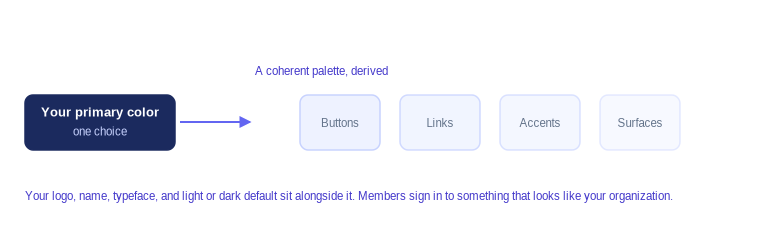
Set your organization's name and tagline, add a logo and an icon, and pick your colors. The app builds its whole color scheme from your main color. So one choice gives you a design that fits together, not a clash of colors. Pick a font from a short list, and choose whether the app opens in light or dark mode.
Members reach your portal at an address that includes your organization's name. The sign-in screen shows your branding before anyone signs in.
Turn off what you do not need
Not every group wants every part of the app. Documents, announcements, elections, polls, the calendar, chat, the member directory, groups and social links each have an on and off switch. Turning one off takes it out of the menus and shuts it off on the server too. So members cannot reach it at all.
A small association that only wants documents and announcements can show just that. Members never see parts of the app their organization does not use.
Turning a part off changes access, not just the menu. For example, turning off Chat stops people from using it. It does not just remove a tile while a second way into chat stays open. Read the current limits on turning parts off before you trim the portal, mainly for the payments preview, which is not yet deployed.
Will your logo and colors work on a phone?
Check a branding change on the sign-in screen, on a member's phone and in the settings preview. A detailed seal that looks clear at full size may be hard to read as an app icon. Pick colors that keep text and buttons easy to read in both light and dark views. Then ask someone who uses large text to check the result.
W3C's text contrast guidance gives a way to check that text stands out from its background. For a branded app, Apple's app icon guidance shows why a simple mark holds up at small sizes better than fine detail or extra text. Use those checks when you adapt your brand. Picking a portal color alone does not make the portal meet accessibility rules.
Notification wording
You can edit the messages sent in your name, starting with the invite email. Placeholders fill in your organization's name and the invite link. New members read your words, not a stock template.
Branded apps in the stores
Every plan works as a web app that members can install on any phone or computer. If you want a real listing in the app stores, we offer apps under your own name and icon as an add-on. They come with the Enterprise plan. We build them, send them to the stores and keep them up to date.
The formats the brand settings accept
Branding takes three colors: primary, secondary and accent. Pick each one, or type the exact hex code from your brand guide. The font is one of Inter, Roboto, Poppins or Lato. Logos and icons are PNG files. A wide logo about 400 by 100 pixels fits the header. The favicon is a 32 by 32 icon for browser tabs. Save SVG artwork as a PNG first. If your logo is already on your website, paste its link to add it. Nobody has to download it and upload it again on a phone.
Mail that comes from your own address
By default, email goes out from a shared address. If your organization owns its own domain, you can connect and verify it. Then invites, announcements and password resets come from an address at that domain. Members see your name in the From line, from an address they already trust.
A group without its own domain can still set a reply address in the Notifications settings. Then a member who hits reply reaches a real officer's inbox.
Who can change what
Branding rights are split, so the person who keeps the logo current does not also decide which parts of the app exist. Owners can change everything. An admin needs Edit Branding for the name, logo and theme. They need Edit Features to turn parts of the app on or off. And they need Edit Notifications to change the invite wording and the reply address.
Branded store app pricing
On the Starter, Growth and Plus plans, a branded app is an add-on. Mobile apps for iPhone, iPad and Android cost $499 to set up, then $39 a month. Desktop apps for Mac, Windows and Linux cost $699 to set up, then $59 a month. Every platform together costs $999 to set up, then $79 a month. The Enterprise plan includes every branded app. We handle the build, the store listing and the updates.
FAQ
Does our logo appear in emails as well?
Not yet. Emails carry your organization's name as the sender name, in the header and in the footer. An announcement email also matches the look of the in-app preview. Your logo and colors are not part of the email design today.
Can we change our colors later?
Yes. You can change branding at any time, and every member sees the change within a few minutes.
What is the difference between the web app and a branded app?
The web app installs to a home screen from the browser and carries your branding. A branded app is listed in the App Store and Google Play under your organization's own name. That is the add-on described above.
See it in your own organization
60 day free trial for up to 25 people. No credit card. Leave any time and take your member list and vote records with you, free. Every plan includes every feature.