The complete HOA annual meeting checklist
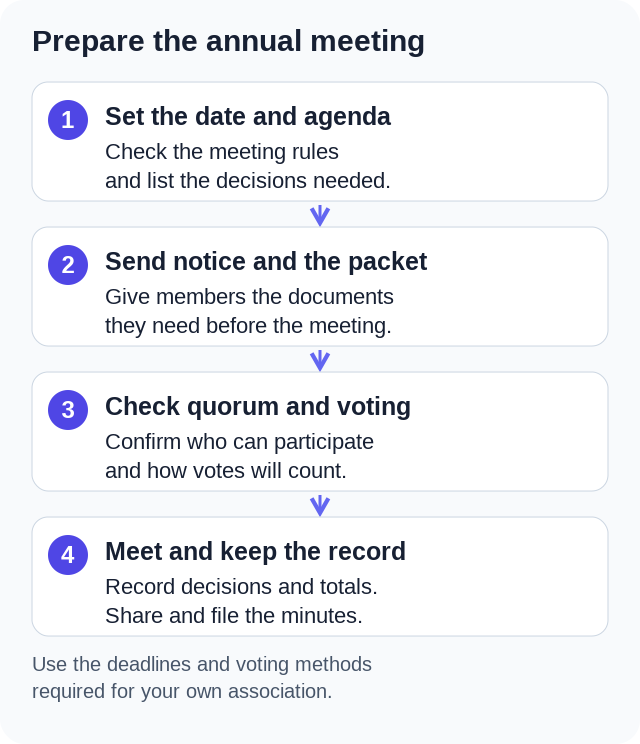
An HOA annual meeting checklist should cover the agenda, required notice, owner packet, voting eligibility, quorum, any election, minutes and retained records. Start from your association's bylaws and state law, then work backward from the meeting date. The example timeline below helps a secretary organize those tasks; it does not replace a required deadline.
8 weeks out: set the frame
- Confirm the date, time, and format (in person, virtual, or hybrid) allowed by your bylaws and state law.
- Reserve the venue or set up the virtual meeting link.
- Review last year's minutes for carried over business.
- If a board election is on the agenda, open nominations now. Our online election guide has the full election timeline.
6 weeks out: build the agenda and the packet
- Draft the agenda: call to order, proof of notice, approval of prior minutes, financial report, manager and committee reports, election, old business, new business, owner forum, adjournment.
- Assemble the owner packet: agenda, budget summary, financial statements, candidate bios, any measures to be voted on.
- Post the packet to your member portal so every owner can read it before the meeting instead of during it.
4 weeks out: send formal notice
- Use your statute and bylaws to set the notice deadline and delivery methods. Move this example timeline earlier if your actual deadline requires it.
- Send notice by every required channel: mail where required, email and portal announcement for consenting owners.
- Include the agenda, the meeting format and joining instructions, proxy forms if you use proxies, and the voting window if you vote electronically.
- Keep proof of when and to whom notice was sent. A portal announcement log keeps that record for you.
2 weeks out: solve quorum before the meeting
Most failed annual meetings fail on quorum. Do not wait until meeting night:
- Arrange electronic voting or proxy collection only where those methods are permitted and count toward quorum under your rules. See our quorum and proxy guide for the rules.
- Track responses and target reminders at owners who have not yet voted or returned a proxy.
- Keep a separate quorum worksheet. One Group Central does not calculate quorum or identify which owners voted.
Meeting week
- Send a 48 hour reminder with the joining link and the ballot deadline.
- Prepare the sign in sheet or virtual attendance capture, and reconcile it against the owner roll.
- Confirm the inspector of elections (where required) and the tally procedure.
- Print a few paper packets for owners who want them.
Meeting day
- Verify quorum using the methods your rules recognize, counting each voting interest only once.
- Follow the agenda; keep the owner forum time boxed.
- Close the election ballot at the announced time and certify the result.
- Record motions, votes, and decisions for the minutes.
After the meeting
- Draft minutes within a week while memory is fresh; approve them at the next board meeting.
- Publish results and minutes to the portal so absentee owners are informed.
- File the meeting packet, notice proof, voter roll, tally, and audit trail together as the permanent record.
- Schedule follow ups for every action item with an owner and a due date.
What goes in the meeting packet?
The meeting packet should let an owner understand what will happen and what they are being asked to decide before the meeting starts. Keep a dated copy of the packet that was sent, even if the working copy changes later. A practical packet contains:
- The meeting date, place or joining link, agenda and instructions for attending.
- The prior minutes, financial report and any budget or project documents needed for the agenda.
- Candidate information and the exact text of each proposal, where the agenda includes a vote.
- Ballot or proxy instructions only where your governing documents and applicable law permit that method.
- The deadline and contact for questions, together with a paper path for owners who need it.
If a proposal changes after notice goes out, keep both versions and ask the board's adviser whether a new notice or a later vote is needed. An updated portal document does not by itself fix a notice problem. Send an announcement identifying the changed file so owners know what they need to read again.
How should the secretary prepare the quorum count?
Prepare a separate quorum worksheet before the meeting. Use the voting interests and methods that your own rules recognize, then reconcile attendance, valid proxies and any qualifying advance ballots without counting the same interest twice. One Group Central does not calculate quorum or provide a named list of who voted.
Illustrative example: a community with 100 equal voting interests and a 20 percent quorum needs 20 represented interests. If the worksheet has 12 attending interests and eight other interests represented by valid proxies, the total is 20. A proxy belonging to one of those 12 attendees does not make the total 21. This example assumes those methods are permitted; it does not establish your community's rule.
Record the count, its basis and the time it was announced in the meeting record. If quorum is missing, follow the adjournment or other procedure your rules actually allow. Do not assume a second meeting automatically has a lower threshold.
Frequently asked questions
What happens if the annual meeting fails to reach quorum?
Follow the procedure in your bylaws and applicable law. Do not assume a reconvened meeting has a lower quorum. Before the next meeting, arrange permitted advance ballots or proxies and a worksheet that counts each represented interest once.
How far in advance must an HOA send annual meeting notice?
Use the notice period and delivery methods in your applicable statute and governing documents. Work backward from the meeting date and record the actual notice deadline; the example timeline on this page is a planning checklist, not a statutory deadline.
Can the annual meeting be held virtually?
A virtual or hybrid format depends on your applicable law and governing documents. Confirm the permitted format, participation and voting requirements before sending notice. A portal ballot alone does not provide a virtual meeting.
Who should keep the meeting records?
The secretary is formally responsible, but records should live somewhere every future board can find them. A member portal document library with an announcement history preserves notices, packets, minutes, and results in one place.
Make next year's meeting the easy one
Send the notice, post the packet, run advance voting, and keep the record in one private portal.
Start your free trial One-page brief for your board (PDF)